AI Visibility
How often AI assistants name you, per topic and per prompt, and how to read a prompt's answers.
The metrics on this page are explained in detail on AI answer metrics.
Prompts and topics
A prompt is a question citeme.eu asks AI chatbots on your behalf. Every active prompt is answered by every chatbot in your plan, on your plan's schedule, and each answer is stored.
Prompts are grouped into topics, so you can read results per theme — for example "Alternatives & comparisons" or "Pricing". A topic has one of two types:
- Ordinary topics hold category questions that don't name you. They drive AI visibility, share of voice and position.
- Topics of type Brand profile hold questions that ask about you by name. They are measured on the Brand Profile and kept out of the numbers on this page.
Each prompt also has a market — the country it is asked from, as if you were physically there with your device or had set your region in Google — and a language, which is separate. Google usually derives the language from the region, and you can override it; the region still decides where the results come from. ChatGPT has nothing to override. It answers in the language the prompt is written in, and Perplexity and Gemini do the same. Only Google AI Mode takes a language of its own, and we send it the one you choose.
If you leave the language unchanged, we use the market's main language: German for Switzerland and Luxembourg, French for Belgium, English for Canada. A French speaker in Switzerland can keep the market on Switzerland and set the language to French. Write the prompt in that language too, because the other chatbots follow the wording, not a setting.
A prompt can also be asked on behalf of different personas. What a persona includes is in the glossary.
How to prepare prompts is covered in Getting started with citeme.eu.
Results summary
The page opens with a summary of your AI visibility results (from 10 answers). The summary is the first row that applies:
| Summary | When |
|---|---|
| Collecting | Fewer than 10 answers so far |
| Rarely named | AI visibility is below 10%, or it is from 10% up to 15% and at least one topic is behind |
| Partly visible | AI visibility is at least 15% and at least one topic is behind |
| Named late | Average position is 4 or worse |
| Visible | None of the above |
Visibility by topic is the share of answers that name you, per topic. A topic is behind when it has at least 10 answers and its visibility is not higher than the typical visibility of the competitors you track (the lower quartile of their visibility, so that a few strong competitors don't turn every topic into a problem). Without tracked competitors that have data, the bar is 10%. In the app this reads as falling behind your competitors' typical visibility.
 The results summary on the AI Visibility page
How to read the example above:
- Summary — insar.sk s.r.o. is Visible: AI names it in about 1 in 3 answers.
- The blue bar (You — all prompts) is the brand-wide AI visibility, here 31.3%. The grey bars below it are your topics, with the number of prompts in each in brackets.
- The "Insurance Companies" topic is at only 12.5%, so What this means for you lists it as a topic where you are absent.
- Visibility vs your competitors on the right compares you (the blue bar) with the competitors you track, over the same answers.
- The 369 AI answers tile opens the prompts table, and 884 AI search queries opens the list of what the chatbots searched for while answering. See AI search queries.
- In the page header, switch between the average of all chatbots (Overall) and a single chatbot, filter by personas and change the date range.
Standing, coverage and actions
- Visibility vs your competitors — your AI visibility next to the competitors you track, measured over the same answers.
- Coverage of your plan — how many of your prompt slots and monthly runs you are using.
- What this means for you — findings in plain language: a topic where you are absent, being named late, one chatbot ignoring you, answers that cite nothing.
- Recommended actions — ranked by severity, then by how many answers the finding affects, with at most one action per topic. Each action explains why it matters and lists concrete steps.
The prompts table
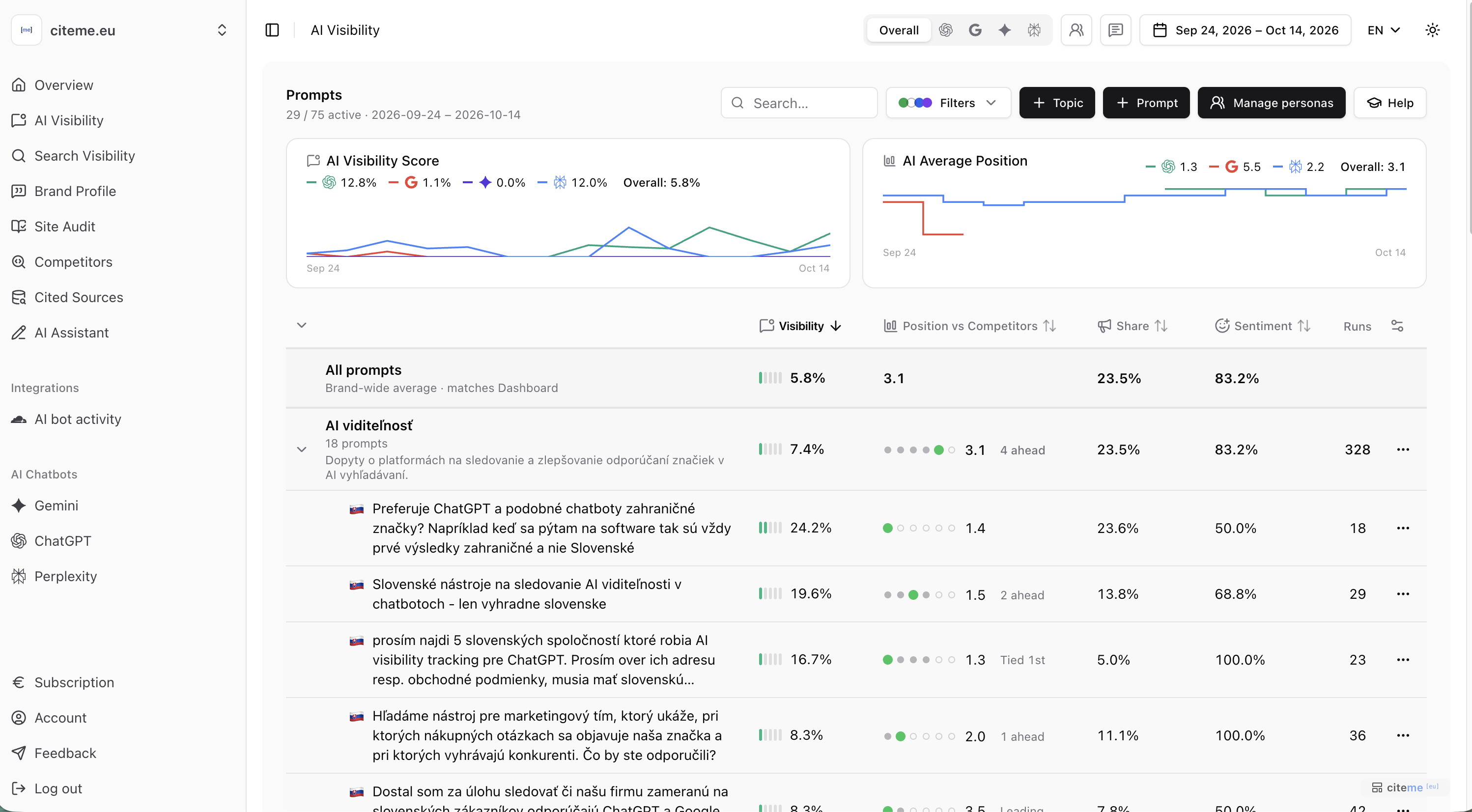
The full table lists every topic and prompt with their AI visibility, sentiment, average position, share of voice, sources per answer and number of runs. The first row is the brand-wide average — the same number as the headline.
You open it by clicking All prompts and metrics, or the collected AI answers — the tile with their count and the link See AI answers.
- The Model filter is in the upper part of the app, in the page header. Use it to see one chatbot instead of the average across all of them.
- Choose which columns to show, and expand or collapse all topics at once.
- Turn on bulk edit to enable, disable, move or delete several prompts at once. Disabling keeps the results for later; deleting removes them permanently.
- Try in chat app opens the prompt directly in ChatGPT, Perplexity or a search engine, so you can see it for yourself.
A prompt's detail page
Click a prompt to see everything behind its numbers:
- Responses — every answer, by date and chatbot, with your brand and competitors highlighted. Filter to answers that name you, don't name you, or cite no sources.
- Performance over time — the prompt's metrics per collection day.
- Competitors in this prompt — which brands are named, and how often, next to you.
- Cited sources — the domains cited in the answers, and whether each one also ranks in your tracked searches. See AI citations vs search rankings.
- How answers vary over time — which brands and which sources keep showing up, and which appear only now and then. Presence is counted across every answer, so for your brand it can differ slightly from the AI visibility figure.
- AI search queries — the web searches the chatbot ran while answering, and the search queries linked to this prompt. See AI search queries.
- Citation X-ray — checks your pages and the cited pages against the prompt. See Citation X-ray.
Correcting a wrong detection
If an answer named a different company with a similar name, or used your brand name as an ordinary word, open the answer and mark it as not mentioning your brand. It then stops counting toward your visibility, share of voice and sentiment. From the same menu you can report a mention we missed or a wrong competitor.