Getting started with citeme.eu: a step-by-step guide to your first results and recommendations
Setting up citeme.eu takes no more than five minutes. Just enter your website's URL, and the system automatically suggests everything else — you simply confirm it or adjust it to your needs. This guide walks you through the whole process and explains each step, including running your free technical audit.
1. Enter your website and create your account
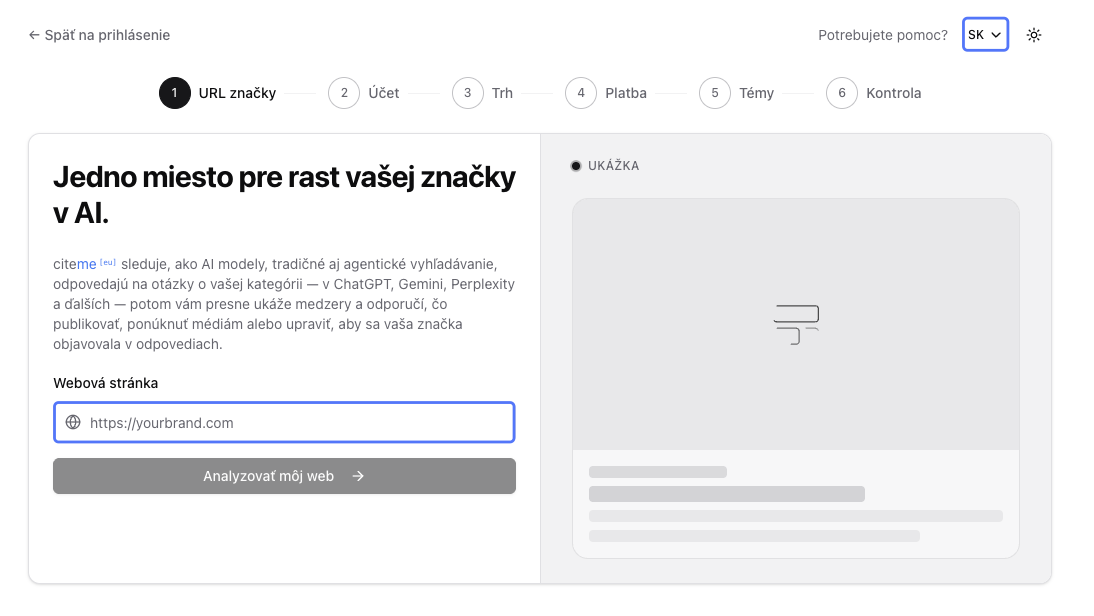
On the app.citeme.eu/signup screen, just enter your brand's website address. citeme.eu checks that the page is reachable and prepares a short preview, so you can confirm it's the right brand before moving on. If everything checks out, all that's left is to create a new account.
2. Confirm your brand and choose a market
citeme.eu automatically works out your main product or service and the field you operate in from your website, and also suggests a target market. All you need to do is confirm or change that suggestion — the market determines the language and region AI models should use when answering your prompts, meaning the questions potential customers ask in AI chatbots like ChatGPT. Think of it as the customer sitting with their phone or laptop physically in that country — similar to Google Search, where results adapt to the user's location.
3. Set up your plan — or don't pay anything yet
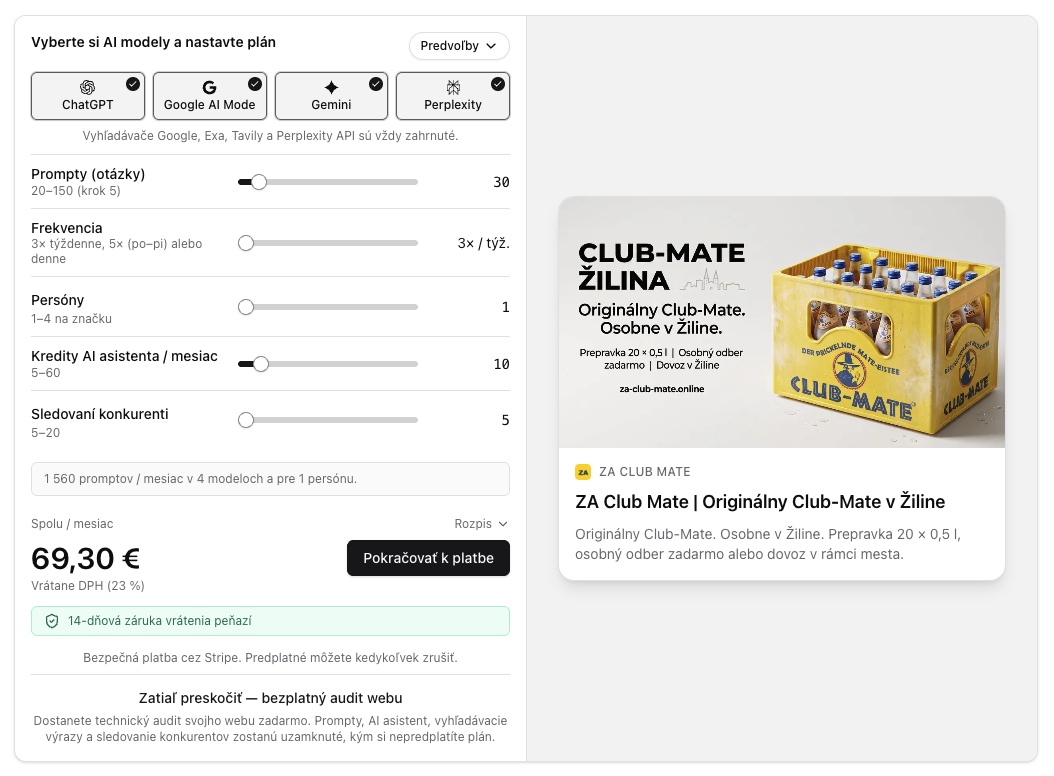
The cheapest plan starts at €20 a month, including a 14-day money-back guarantee. If you'd rather not pay yet, choosing to skip payment still gives you access to the full, unlimited technical site audit — for free.
If you go with a paid plan, you can configure the following:
- AI models — choose between ChatGPT (OpenAI), Google AI Mode, Gemini (Google) and Perplexity. We recommend turning on all four, but if you want to save money, feel free to pick just one or two. ChatGPT is still the most widely used model, though Google AI Mode and Gemini are gaining popularity fast.
- Prompts (number of questions) — a prompt is simply a question you ask an AI model, for example “What's the best HR software for a 50-person team?” or “Alternatives to Salesforce”.
- Frequency — three times a week (Monday, Wednesday, Friday), five times a week (weekdays), or daily (every day, including weekends). Three times a week is enough for most brands — it catches changes in AI answers without running up unnecessary costs. Why run prompts more than once at all? Because AI models keep learning and changing their answers. If a price, availability or review changes, the model's answer can change with it. On top of that, AI models often answer the exact same question differently — even within the same day. Running prompts repeatedly is how you catch those changes.
- Personas — a persona lets you simulate a specific type of customer asking the questions. For each persona you can define an age group (e.g. 25–34), occupation and company size (e.g. a marketing manager at a 50-person company), gender, and a free-text description with further details (interests, pain points, stage of the buying decision, and so on). If your products target several types of customers, we recommend picking more than one persona. By default, a persona is neutral — the same as a customer chatbots don't profile (for instance because personalization is turned off, or they're asking without being logged in). Even on the single-persona tier, though, you can choose whether to use that default neutral setting or a precisely defined persona.
- AI-assistant credits — how many times a month you can run the AI assistant. The AI assistant covers several functions, such as checking the content of your own (or a competitor's) pages, generating extra prompts and keywords, or generating content like an FAQ section for your site. Even the base plan includes 5 credits a month to try these features.
- Competitors tracked — how many competitors you track alongside your own brand. For those competitor sites you get the same metrics as for your own brand (e.g. AI visibility, classic search ranking, technical audit). The base tier includes 5 competitors — citeme.eu automatically finds and regularly suggests competitors as they turn up in AI models' answers.
Clicking through to pay redirects you to a secure Stripe checkout, where you can also apply a promo code if you have one. If you need an invoice made out to a company, choose the option to buy as a business and fill in your billing details, including your VAT number.
4. Review your topics (paid plans only)
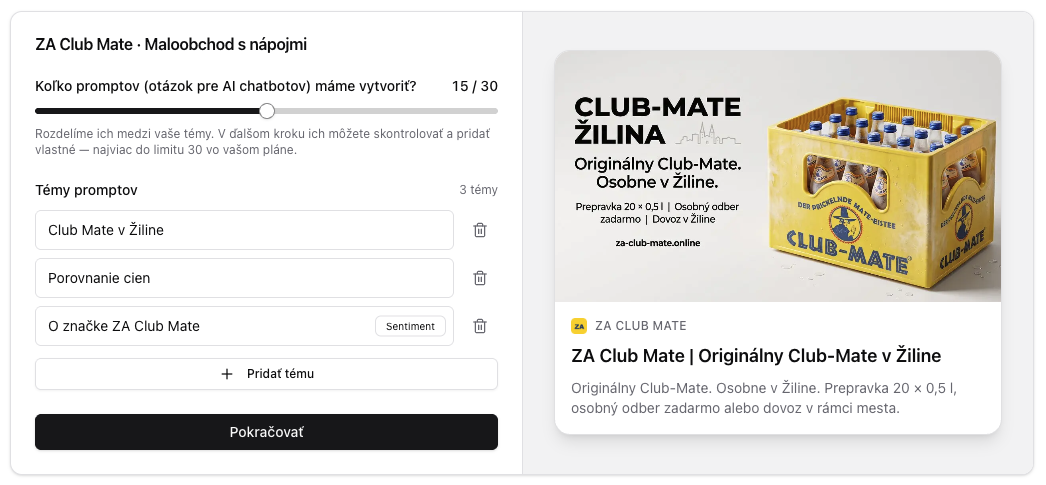
After payment, the system automatically generates topics — these let you track and evaluate prompts in logical groups later, not just one by one. citeme.eu automatically generates 3 to 5 topics based on information from your website, and one (the last) topic is a special “Sentiment” topic that groups only prompts and questions directly about your brand. Those are then used to monitor how AI chatbots talk about you. Thanks to this, citeme.eu will let you know, for example, if an AI model rates you negatively in a certain area, or can't work out your product's exact features from what's available online. Questions from this topic aren't used to calculate AI visibility, since the brand is named directly in the question.
Topics serve as the basis for generating prompts — you can set how many prompts get generated. Both topics and prompts can, of course, be edited, added to, or removed at any time from the dashboard.
How to choose good topics:
- Decide based on what customers actually ask, not your website's structure — i.e. by intent (comparison, pricing, availability, how-to). Ideally keep at least 5 prompts per topic, so you can reliably track trends and changes in AI answers.
- Create a dedicated topic for questions comparing you to competitors or alternatives — questions like “Alternatives to Salesforce”. It's a very common way people phrase questions in AI chatbots.
- Always keep the Sentiment topic on — it's a source of information that will alert you early to a problem with how your brand is perceived.
5. Choose your prompts for AI chatbots (paid plans only)
Generating the prompts takes about a minute. Once the list is ready, you can remove individual prompts, add your own, assign them to a topic, and then choose to run everything immediately or schedule it. Running immediately uses your monthly credits and gets you first results within minutes. Scheduling waits for the next regular run (around 03:00 UTC), so the dashboard stays empty until then.
Alongside running your prompts, citeme.eu is also finding your competitors in the background, triggering the technical site analysis, and checking whether your website is properly indexed by Google and Bing. You'll find those results on the page you're automatically redirected to next.
How do I choose the right prompts to track?
- Write them the way a real customer would type them — in plain, natural language, the same way you'd ask ChatGPT yourself.
- Use your existing customer communication as a basis — emails, forum questions, or notes from Salesforce or another CRM system.
- Go beyond short keywords like “HR software.” Real customer intent is usually more specific: “Affordable, well-rated HR software for a small company with around 20 employees” or “Payment gateway for an EU company with easy integration and low fees.”
- Build prompts around the actual decisions customers make: “What's the best …”, “Which is better, A or B?”, “Give me 5 alternatives to X.”
6. Your first results and recommendations — the technical site audit
Whether you paid or skipped payment, your first results show up on the technical site audit page. If you skipped payment, this will be the only part of the citeme.eu app you have access to — along with your account settings and the option to activate a subscription at any time. If you paid, your prompts are running in the background.
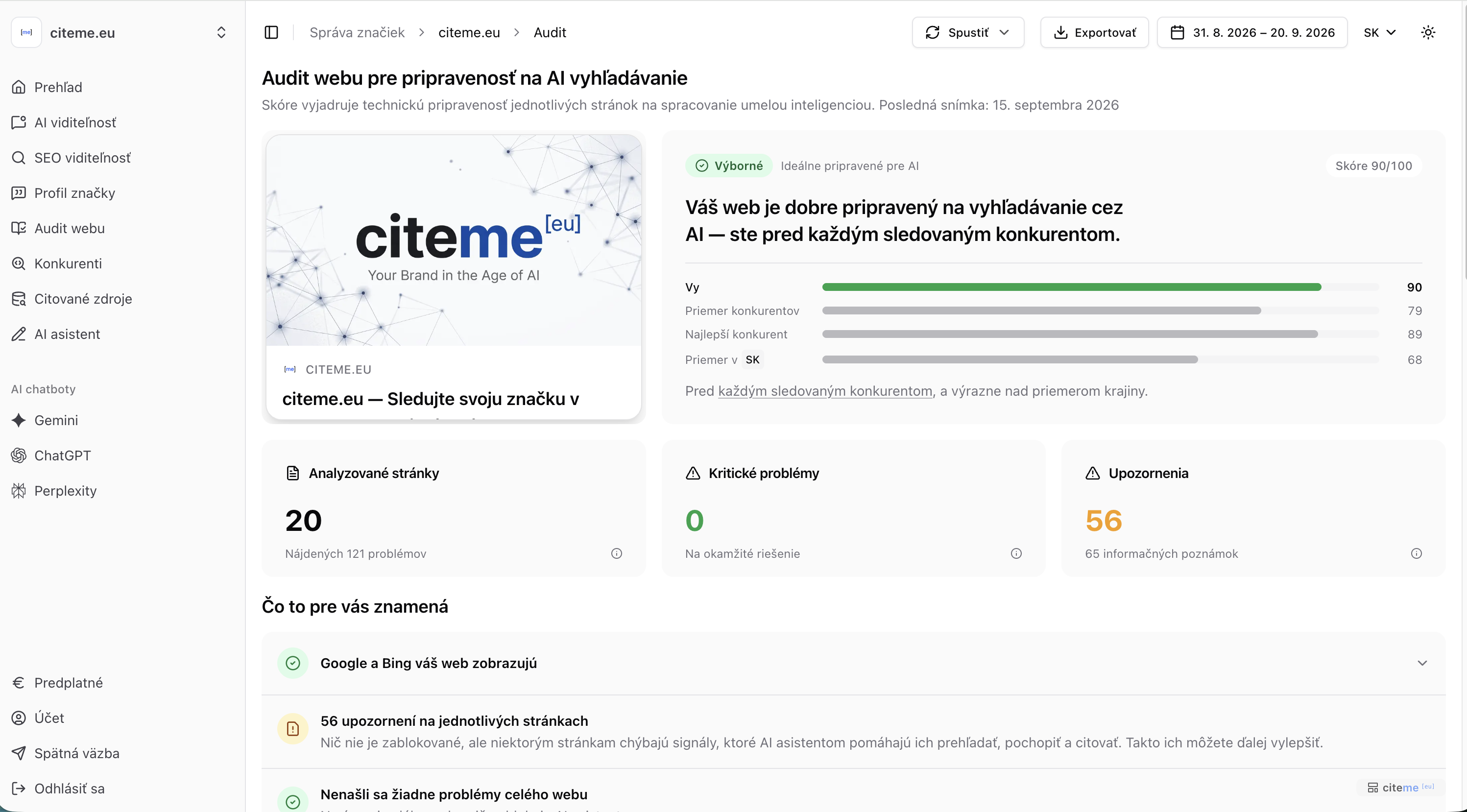
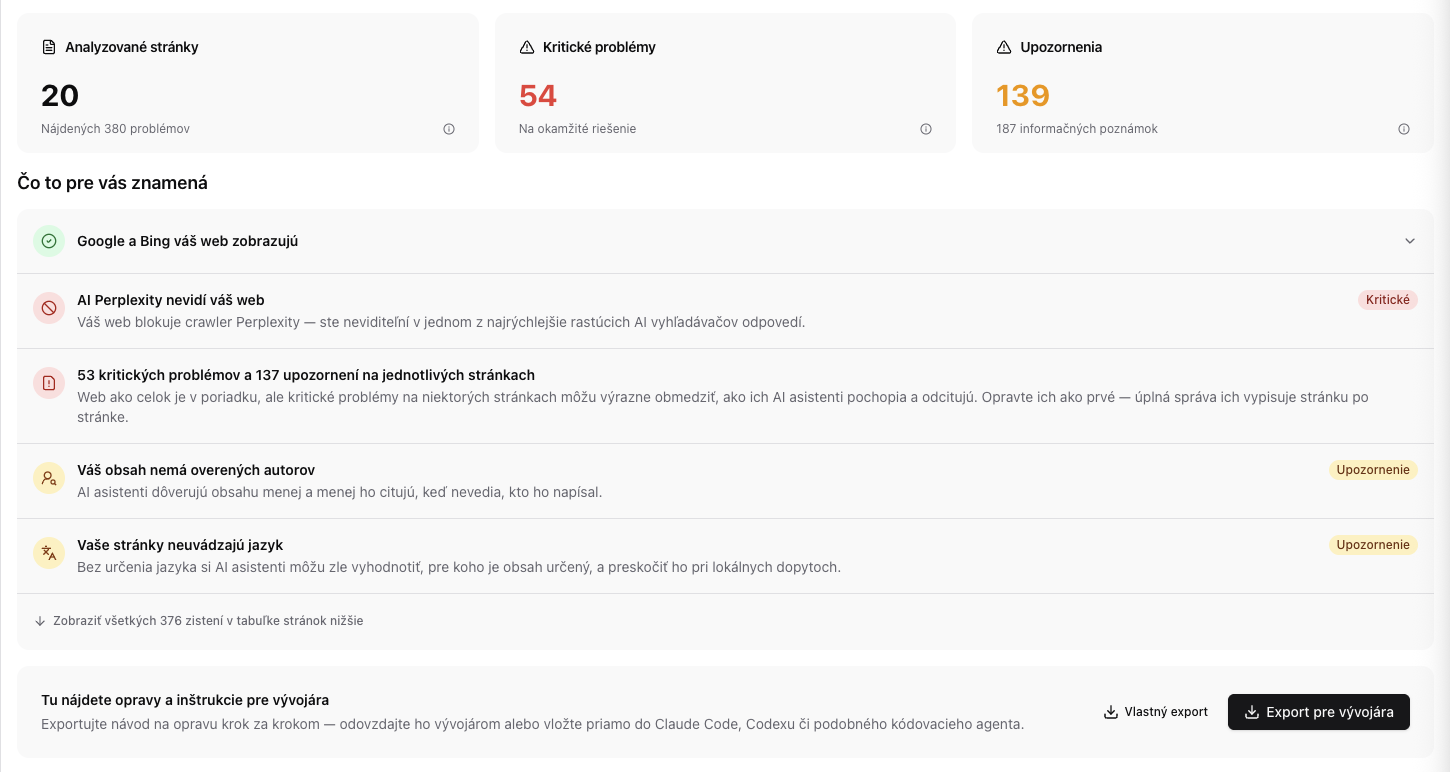
The audit shows how ready your website is for both classic and AI search. It's based on metrics and recommendations from Google and Bing, and also includes a test for whether your pages block AI bots' access. For context, the app also shows a score comparison against your direct competitors, as well as the average for the whole country (based on your market — you can change your selected competitors on the Competitors page). A handy feature is the quick export of fixes for your developer, which you can tailor to the target audience (developer, product owner, PDF, markdown, filtering by severity, and so on). The Export section also includes a standalone guide explaining what each check means. We covered the common technical issues on Slovak websites in more depth in an earlier article on how ready Slovak websites are for AI search.
A separate test checks whether your pages are properly indexed by Google and Bing. This is mostly a problem for newer websites — the consequence of poor indexing is that a page simply won't show up in AI models' answers. If you're not indexed by Bing, that shows up in ChatGPT's answers. Google indexing, meanwhile, is key for Gemini and Google AI Mode, and it's also the foundation for agentic search engines like Exa and Tavily.
Paying customers also get access to a content audit. The content side looks at the quality and relevance of the content itself — essentially, whether a page offers something unique and useful. Specifically, it evaluates originality, clarity, verifiability, and whether the content is written to be readable for people rather than bots. The content audit is part of the AI assistant, which — like the AI and SEO visibility results — we'll cover in its own dedicated article.
Try citeme.eu today for free and see the first results for your own brand.