What's new

What's new in citeme.eu

New features and improvements, explained from your side of the screen.

November 2026

NewProfiles and reviews

Profiles and reviews: everything that shapes how AI and customers see you

AI chatbots don't only read your website. When they describe or recommend a business, they also lean on directories and Reddit threads. Your customers, in turn, read reviews when they choose where to go or whom to buy from. Profiles and reviews keeps all of these places in one view and tells you what to do in each, so you look good both to AI and to the people who read about you.

  • Directories to join shows the directories AI chatbots cite where you don't have a profile yet. Auto-detect finds the profiles you already have, so their citations count as yours.
  • Reviews reads your Google Maps reviews every week, including what the text says, and points out the ones that need a reply. That includes good ratings whose text mentions a problem, which a star count hides.
  • Discussions saves you from opening every Reddit thread AI chatbots cite, only to find most of them are off-topic. We read them for you each week and show the ones that matter, with the threads worth a reply marked. The AI Assistant can draft that reply. Nothing to set up.

You'll find it in the menu under Profiles and reviews. Your other websites and profiles are now added here too, instead of in Account. Details are in the Profiles and reviews documentation.
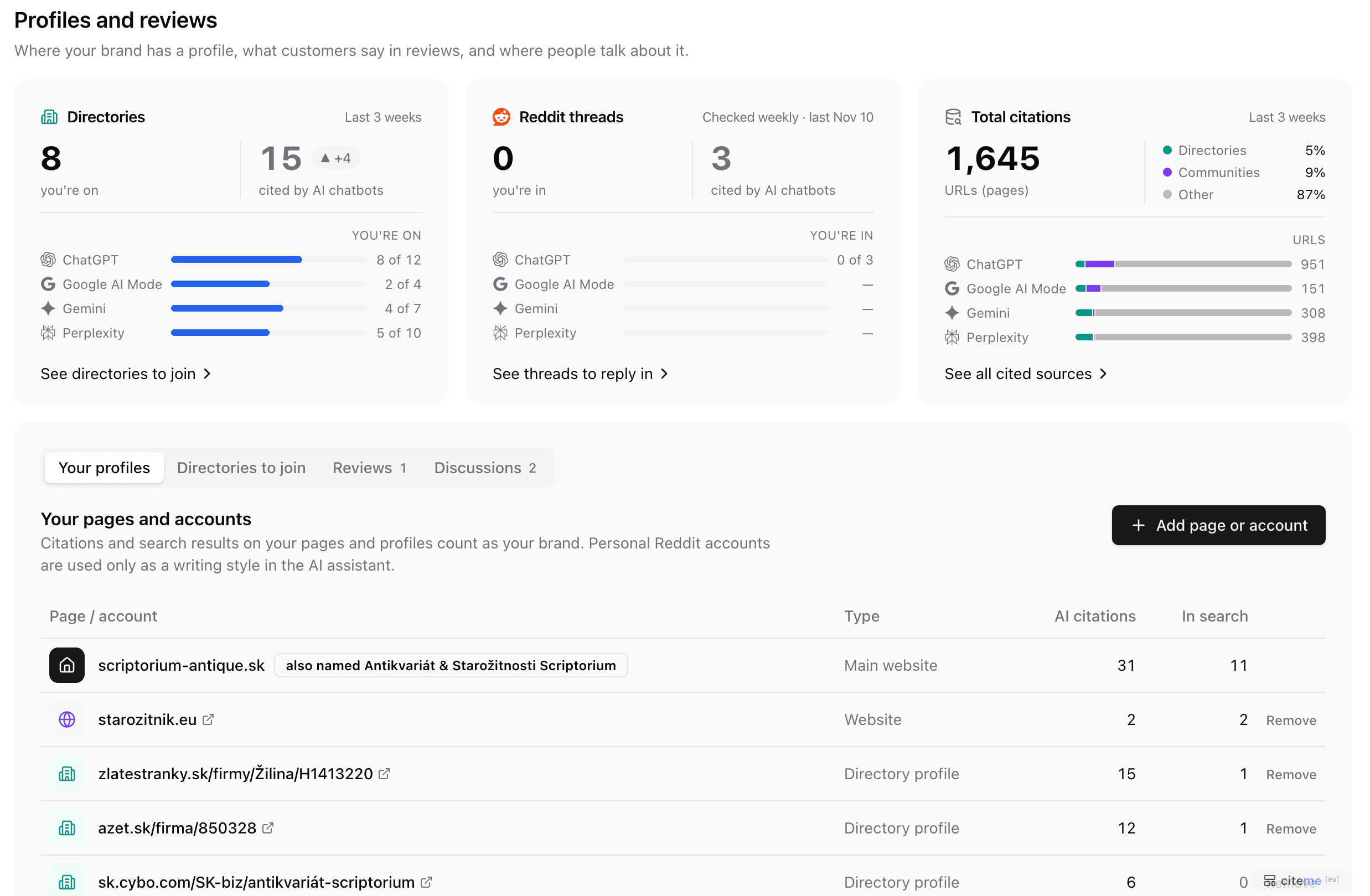
The Profiles and reviews page: the Directories, Reddit threads and Total citations cards above the Your profiles tab

Learn more:Profiles and reviews
NewAI Assistant

The AI Assistant now writes LinkedIn posts

Need a LinkedIn post but don't know where to start? Open Generate web content, choose LinkedIn post and fill in the short form: the language, what the post should be about and, if you like, a note. A moment later you get three ready-to-use posts, with one recommended and a tip on what to attach.

Pick the one you like best, or switch between them as often as you want. If none is quite right, tell us what to improve with Not quite right? and all three are rewritten once, at no extra cost.

Reddit posts, blog articles and FAQs now work the same way, and the robots.txt file is free. Details are in the AI Assistant documentation.

Learn more:AI Assistant

October 2026

NewPlatform

Ask about citeme.eu features, right in the app

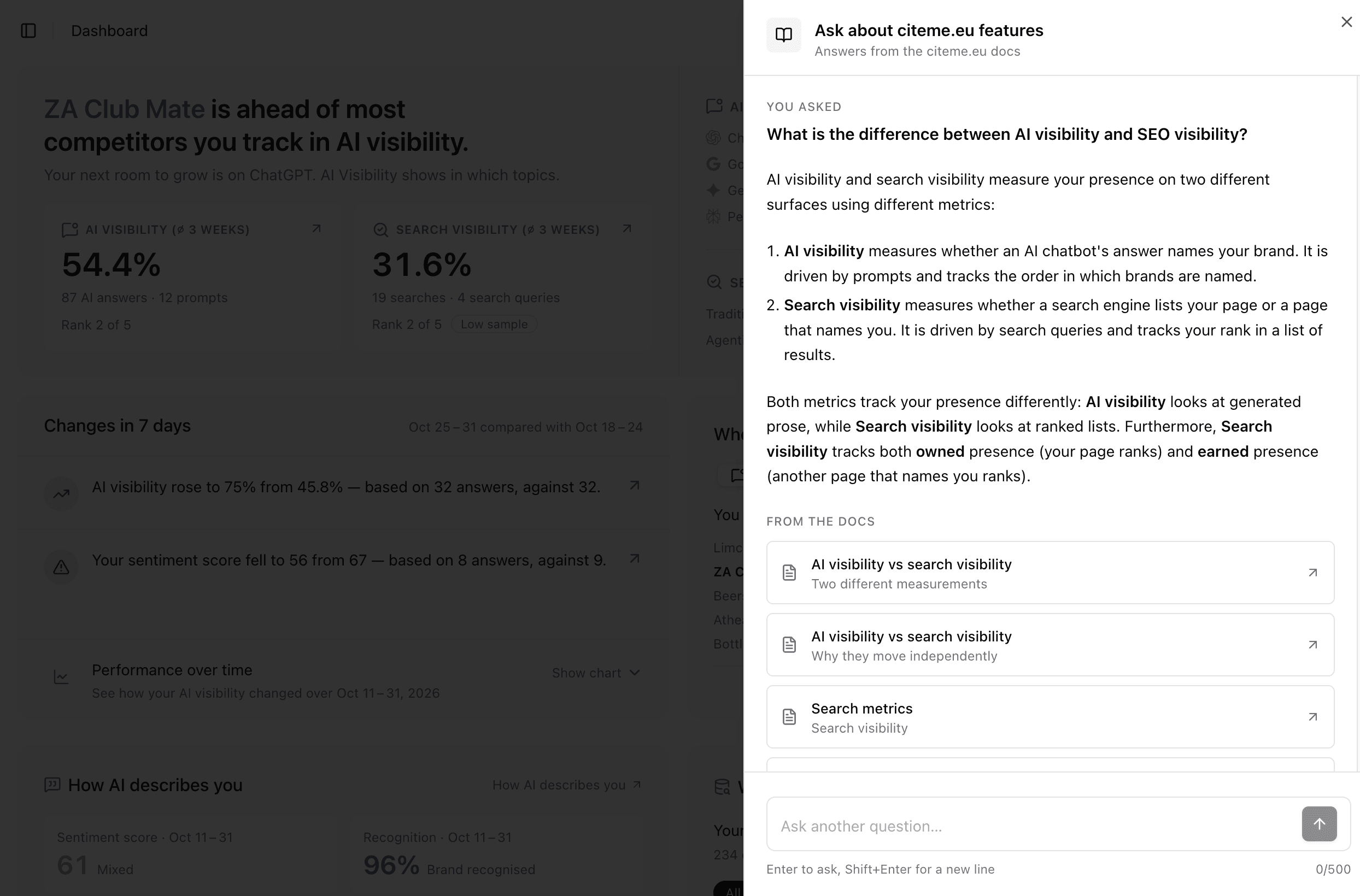
Not sure what a number means or where to find something? Click ? at the top of any page and choose Ask about citeme.eu features, or open Help in the menu. Type your question and within a couple of seconds you get a short answer straight from our documentation, with links to the pages it came from.

Every page suggests a few questions to start with. The answers are about how citeme.eu works, not about your own results: for those, connect citeme.eu to Claude or ChatGPT and ask them about your data. If the documentation doesn't have the answer yet, send the question to our team with one click.

The Ask about citeme.eu features panel next to the Overview page: the question "What is the difference between AI visibility and SEO visibility?", a short answer in two numbered points, and links to the sections of the documentation it came from

Learn more:Connect Claude or ChatGPT

NewAI VisibilitySearch Visibility

Compare answers: test a prompt in every AI chatbot and search engine at once

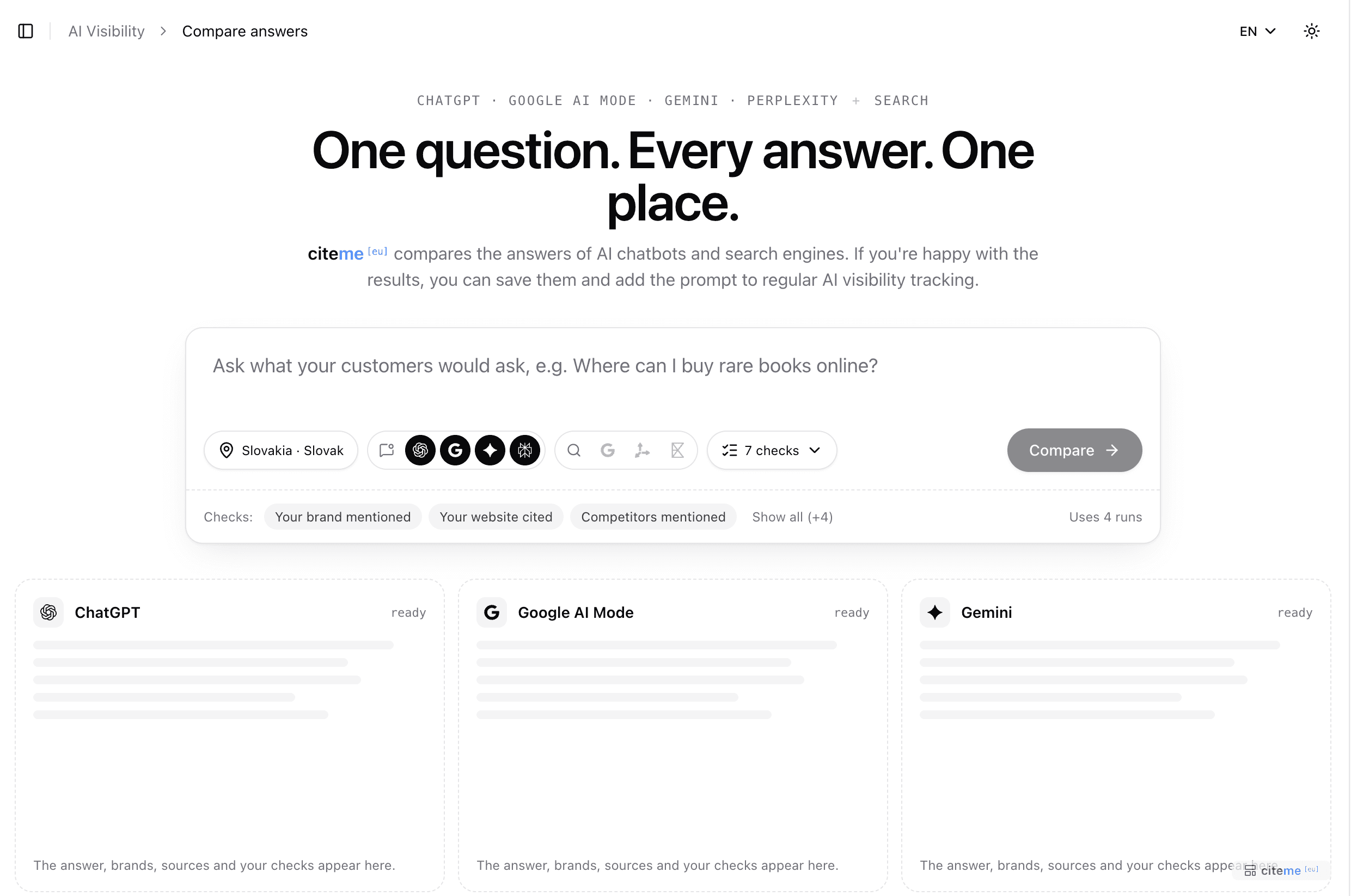
Is a prompt worth tracking? With most AI visibility tools, you find out only after adding it and waiting a day or more for the first results. Here you see it within seconds: how ChatGPT, Google AI Mode, Gemini and Perplexity answer it, side by side. Google with its AI Overview, Tavily and Exa can join too.

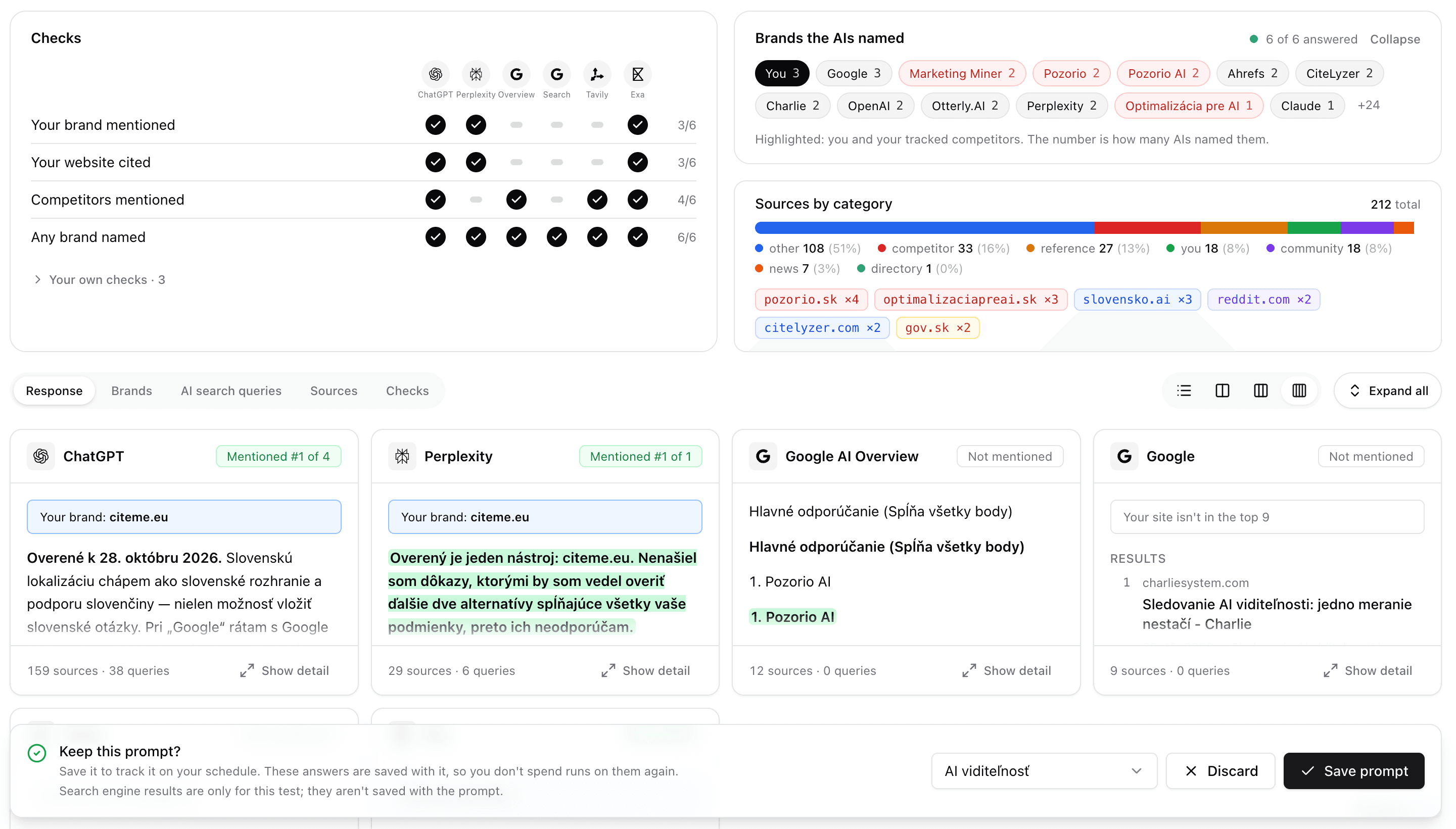
Every answer is checked for your brand, your website and your competitors, plus up to 5 checks of your own: yes or no, a rating, or a choice between options you set. Like what you see? Save the prompt, and these answers become its first results.

Compare answers before a run: the question box, Slovakia preset as the market, four AI chatbots preselected, search engines still off and 7 checks, with the ChatGPT, Google AI Mode and Gemini cards waiting for answers below
Results for one question: ChatGPT and Perplexity name citeme.eu first and cite its site, while Google AI Overview and Google don't name it. The checks table shows the same for each chatbot and search engine, next to the brands the AIs named, with competitors highlighted, and the sources by category

Learn more:Compare AI chatbot answers in one placeGenerating prompts

ImprovedHow AI describes you

Brand Profile has a new name: How AI describes you

The page that shows what AI chatbots say when you ask them about your brand directly is now called How AI describes you. The new name says better what you will find there. Nothing on it changes: the sentiment score, recognition, what chatbots praise or criticise you for, and the recommended steps.

Topics with questions about you by name are now called Brand questions. The page stays in the same place in the menu, and saved links still work.

Learn more:How AI describes you

NewSite audit

Not only AI bots: we also look at what people see

citeme.eu shows you whether AI bots can find and recommend your site. Even so, it is still mostly people who open it, and they matter to us even more. When we checked a large number of homepages, we kept seeing problems that site owners don't know about: text that can't be read, a layout that breaks, or cookies that behave differently from what the banner promises.

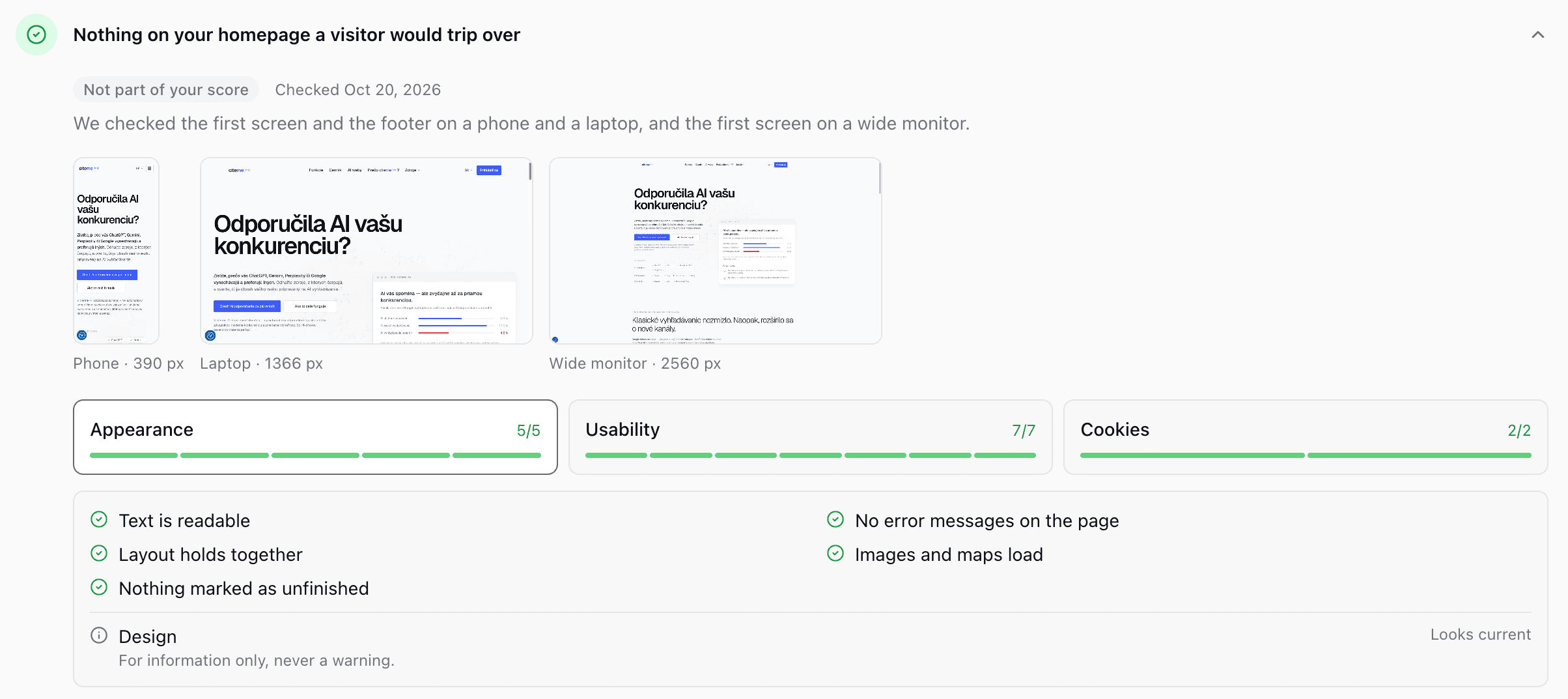
The site audit now warns you about these too. You see your homepage on a phone, a laptop and a wide monitor, and the findings in three groups: Appearance, Usability and Cookies.

A warning might point to text that is hard to read, a layout that breaks or a slow first screen. It can also show tracking that starts before a visitor has chosen, or carries on after they refuse optional cookies.

These warnings are not part of your audit score. You can hide what you have already handled. So that your site works for people and for AI.

What visitors see, with nothing a visitor would trip over: the homepage on a phone, a laptop and a wide monitor, and Appearance, Usability and Cookies all passed

Learn more:Site audit

NewIntegrations

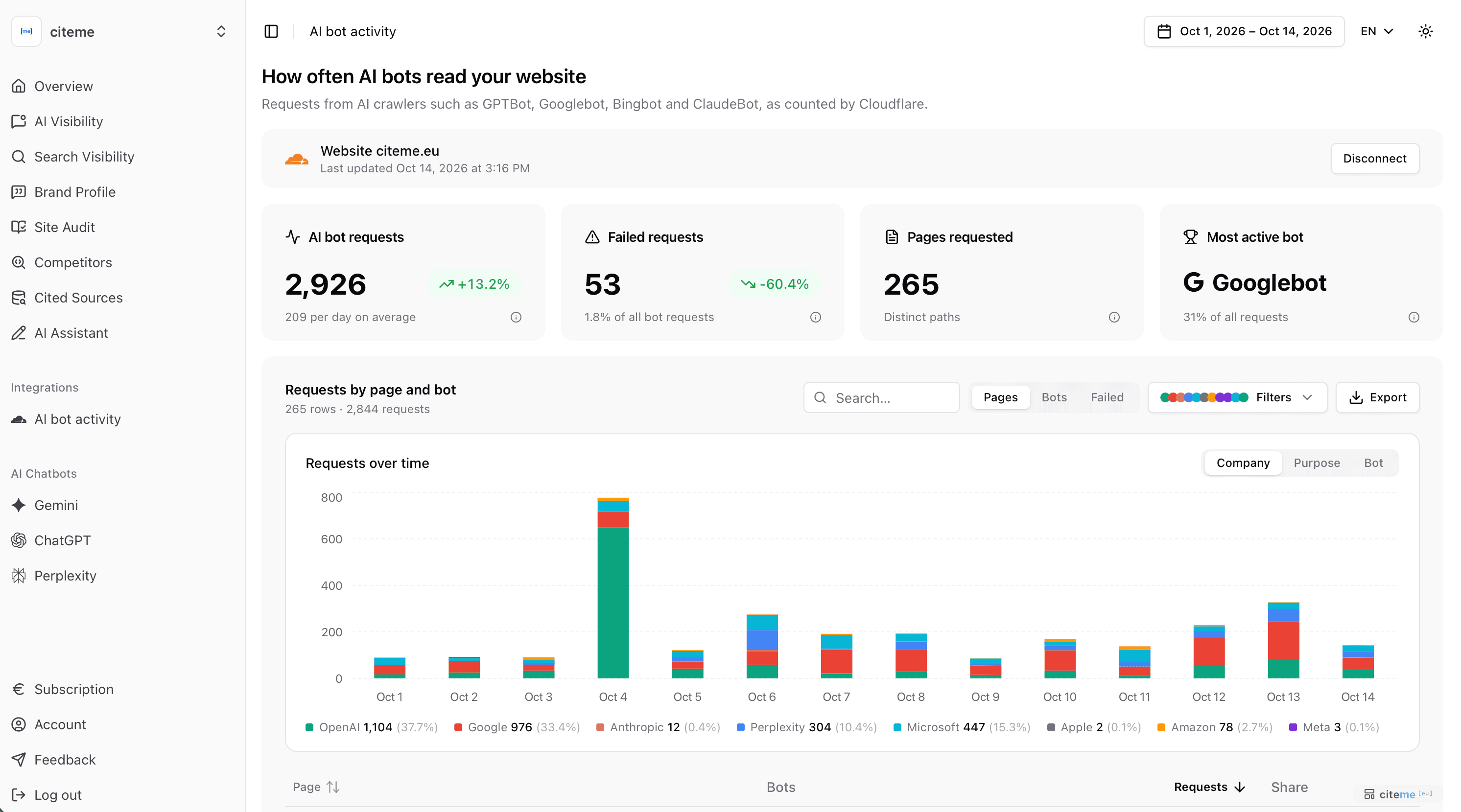
See which AI bots read your site

Connect the Cloudflare account for your website and see how often AI crawlers request your pages, and which pages they open. The connection is optional and read-only: citeme.eu cannot change your DNS or security settings, and the site audit is unchanged.

The page shows the requests, the bots that made them, the pages they opened and the requests that failed. Filter by company and by why the bot came — training a model, building a search index, or opening a page while someone is asking. This is separate from AI visibility, which still comes from the prompts, and from AI referrals, which count people who arrived from an AI answer.

AI bot activity: AI bot requests, pages requested, the most active bot and failed requests, and a chart of requests over time by company

Learn more:Monitoring AI bot activity

NewAI Assistant

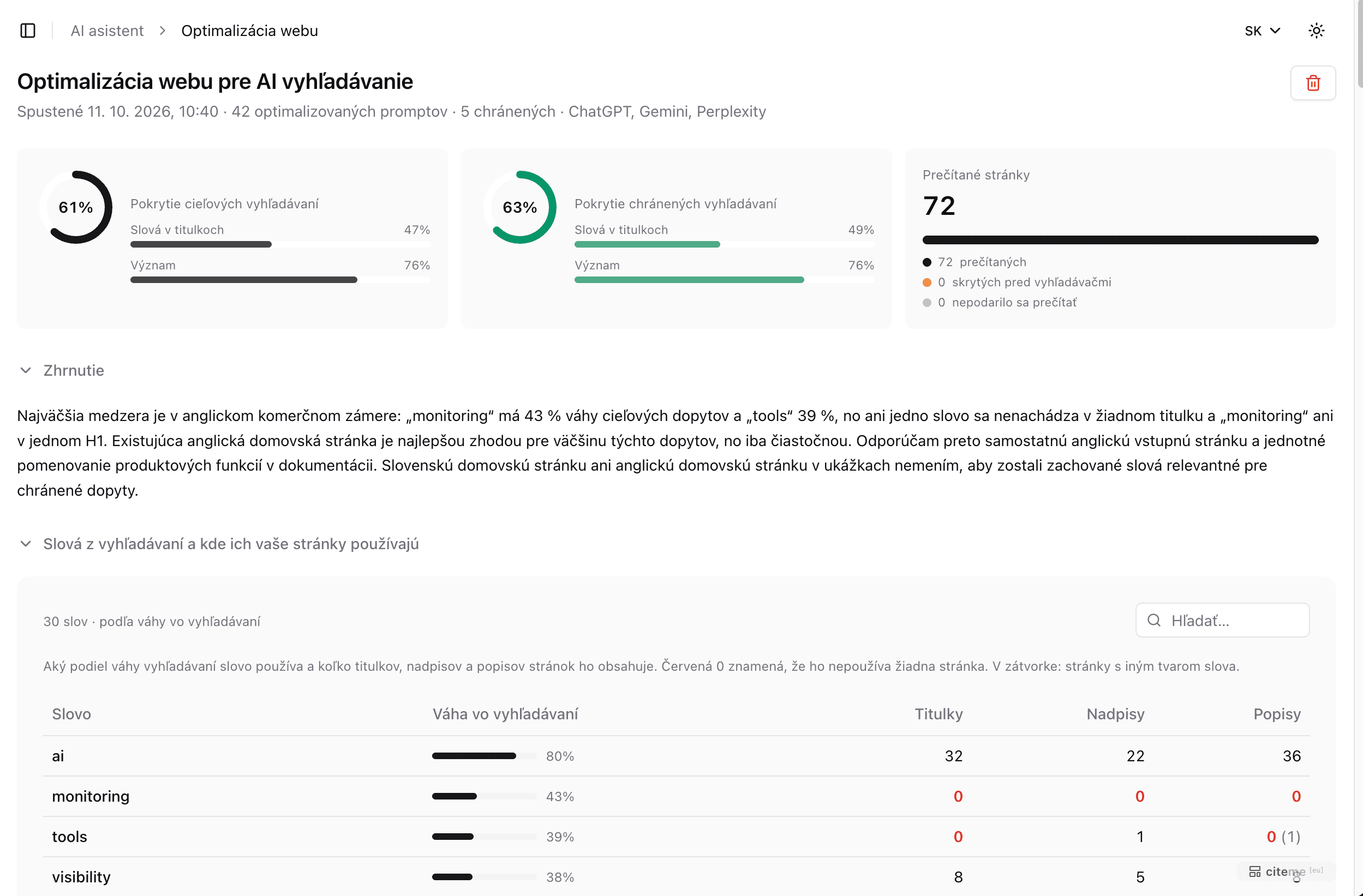
Tool to optimize your site's AI search visibility

AI assistants search the web before they answer, and those searches decide which pages get found. The AI Assistant now compares them with your page titles, headings and descriptions and suggests what to change.

You choose the prompts to optimize for. Unticked prompts where you already show up are protected, so a suggestion must not weaken searches your pages already match. You can protect or leave out any prompt yourself. Analyze my site uses one AI Assistant credit, returned if the analysis fails.

Site optimization for AI search: target searches covered, protected searches covered, pages read, the summary, and the words those searches use, with a red zero where no page title says the word (Slovak interface)

Learn more:Site optimization for AI searchAI Assistant

NewSite audit

Site audit: is your site ready for AI agents?

The site audit has a new Agent readiness category. AI agents such as ChatGPT Atlas and Gemini in Chrome don't just read websites, they also use them: they fill in forms, click buttons and look things up for people. The new checks show how easy your site is for them to use:

  • whether your pages are also available as a simple text version that agents can read quickly,
  • whether your site says how AI may use your content,
  • whether your form fields, buttons and links are labelled, so agents know what they do.

For now, these results are for your information. As more people let AI agents browse for them, they will count for more.

Learn more:Site auditSite audit score

ImprovedAI Visibility

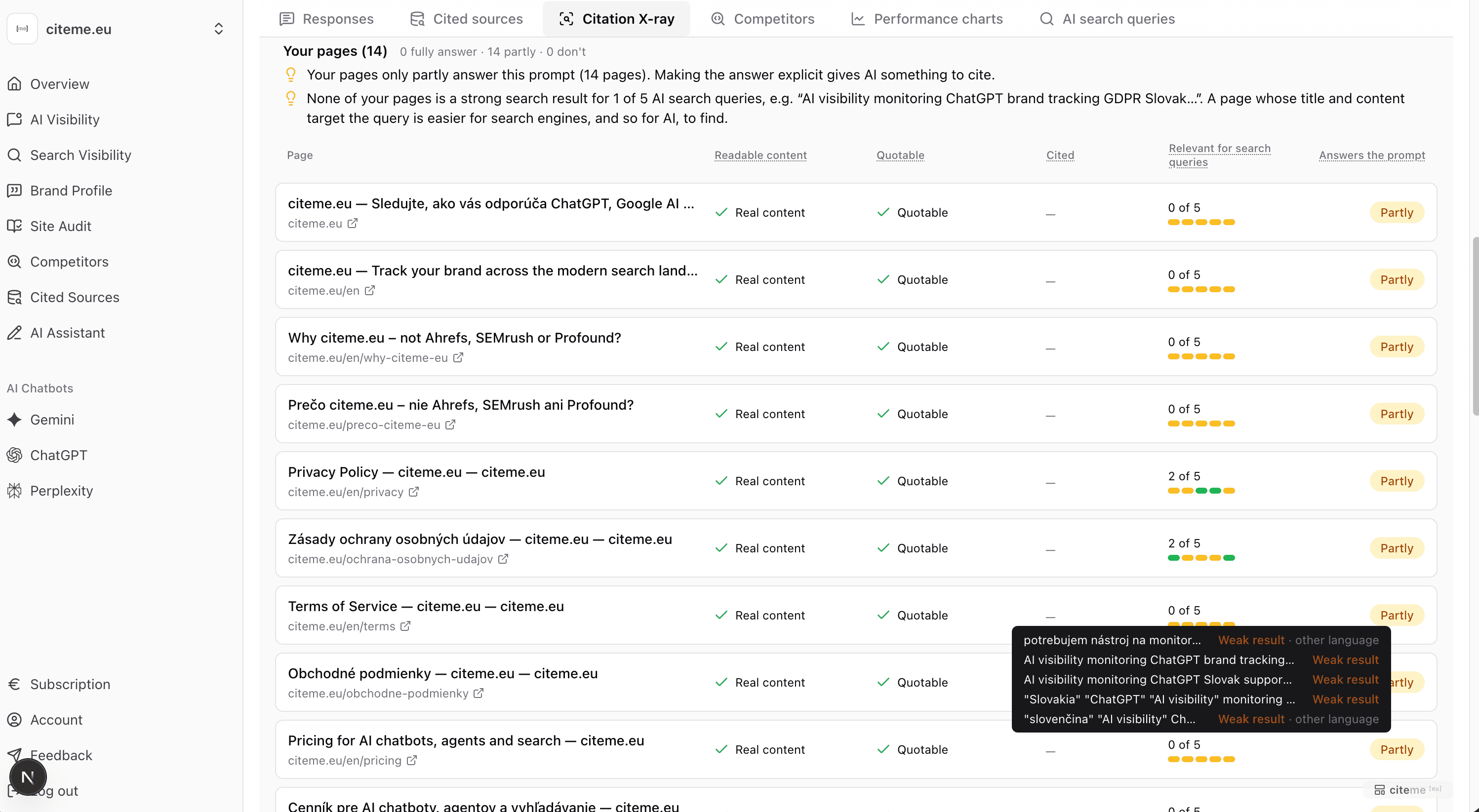
Citation X-ray: do your pages match the searches AI runs?

AI assistants don't search for your prompt itself. They run their own searches, and those decide which pages get found and cited. Citation X-ray now also checks your pages against those search queries. A new Search queries tab in the picker lists the ones AI ran for the prompt, most used first, with the top 5 ticked. You can filter them by intent and language, and pick up to 6. In the results, each page shows whether it is a strong, weak or no result for each query. A line under Your pages says for which queries none of your pages is a strong result, and Track adds a query as a keyword, so Search Visibility measures where it really ranks. The check judges relevance from the page's title and text. It is not a predicted position.

Citation X-ray results with the Relevant for search queries column: for each of your pages, how many of the AI search queries it is a strong result for, and a hover listing each query with its verdict

Learn more:Citation X-rayAI search queries

September 2026

NewAI AssistantAI Visibility

Content review: which of your prompts a page answers

A content review of a single page or draft now also checks it against all your active prompts (up to the 100 newest). The new Prompts tab shows which prompts the content answers, which it answers partly and which are off-topic. For prompts the content answers, it shows whether the content is quotable. It is the Citation X-ray check turned around: one page against all your prompts. Before you publish a draft, you can see which prompts it covers and which still have no page answering them.

Learn more:AI AssistantCitation X-ray

NewAI Visibility

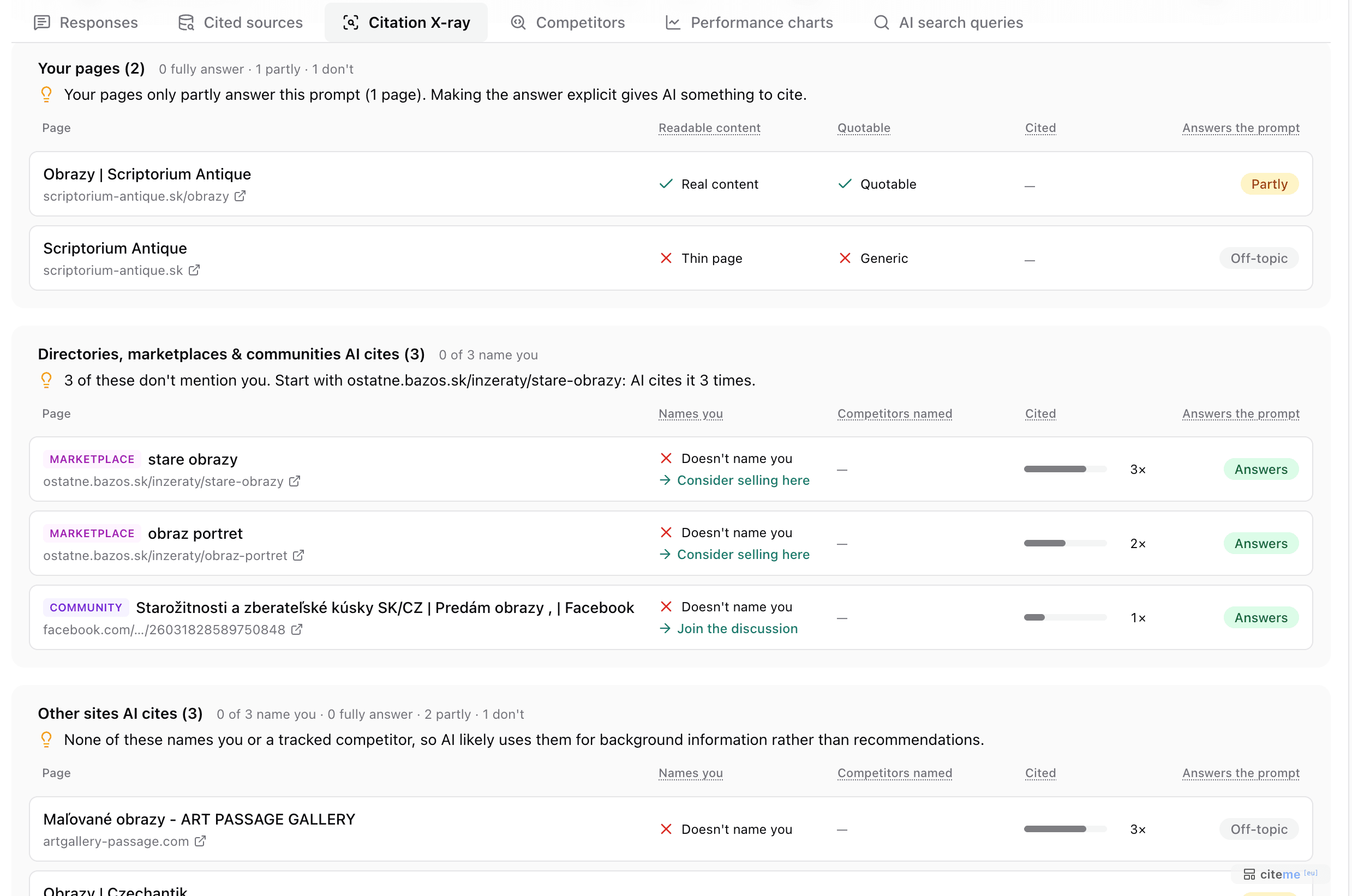
Citation X-ray: why AI does or doesn't name you

A new tab on every prompt. Pick your own pages and the pages AI cites for that prompt, and we read each one: does it answer the question, does it give facts AI can quote, does it name you — and which competitors does it name instead? Every page gets a next step, from a directory listing you're missing to the competitor page you need to beat.

Citation X-ray results: your pages, the cited directories, marketplaces and communities, and other cited sites, with whether they name you and answer the prompt

Learn more:Citation X-ray

NewSite audit

Search engine indexing check

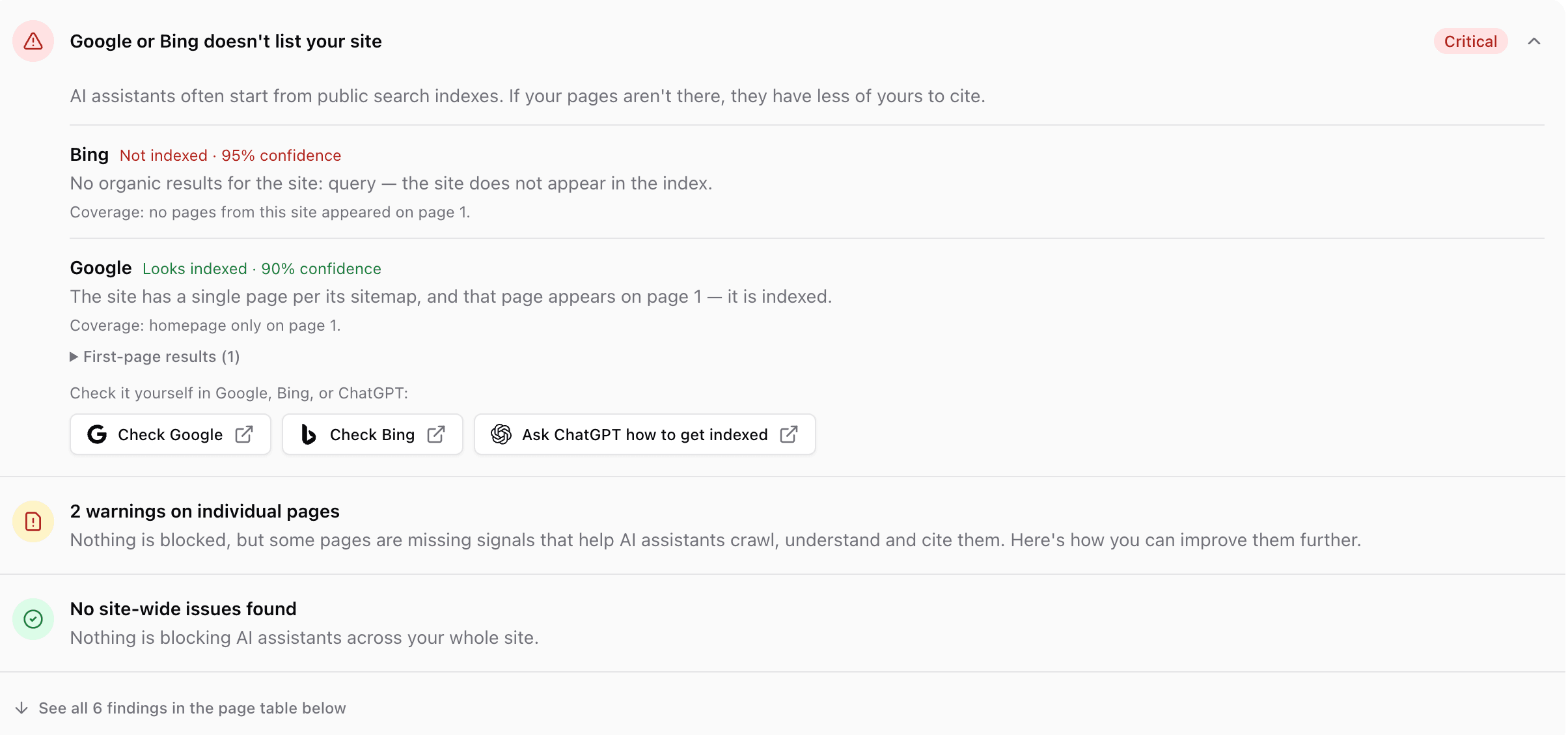
The site audit can check live whether Google and Bing list your pages. AI assistants often start from public search indexes, so a site missing from them gives assistants less to cite. The check doesn't change your audit score.

Indexing check in the site audit: Bing doesn't list the site, Google does, with the confidence, the page-1 coverage and buttons to check it yourself

Learn more:Site audit

NewIntegrations

Ask Claude or ChatGPT about your visibility

Connect citeme.eu to Claude or ChatGPT and ask in plain language: how did my visibility change last month, which competitors are gaining? The assistant uses the same definitions as your dashboard. It can pause, add or reword your prompts and search queries, but never delete anything.

Learn more:Connect Claude or ChatGPT

August 2026

NewAI AssistantSite audit

Content review

Score any page or draft against Google's and Bing's guidance for AI answers, with specific findings on what to improve. Review one page, or every audited page at once.

Learn more:AI Assistant

June 2026

NewAI Visibility

Google AI Mode

Google AI Mode joins ChatGPT, Gemini and Perplexity as a tracked AI assistant. Add it to your plan, and pick it in the Model filter to see how it answers your prompts.

Learn more:How citeme.eu works

ImprovedSite audit

Site audit reports as PDF, and a guide

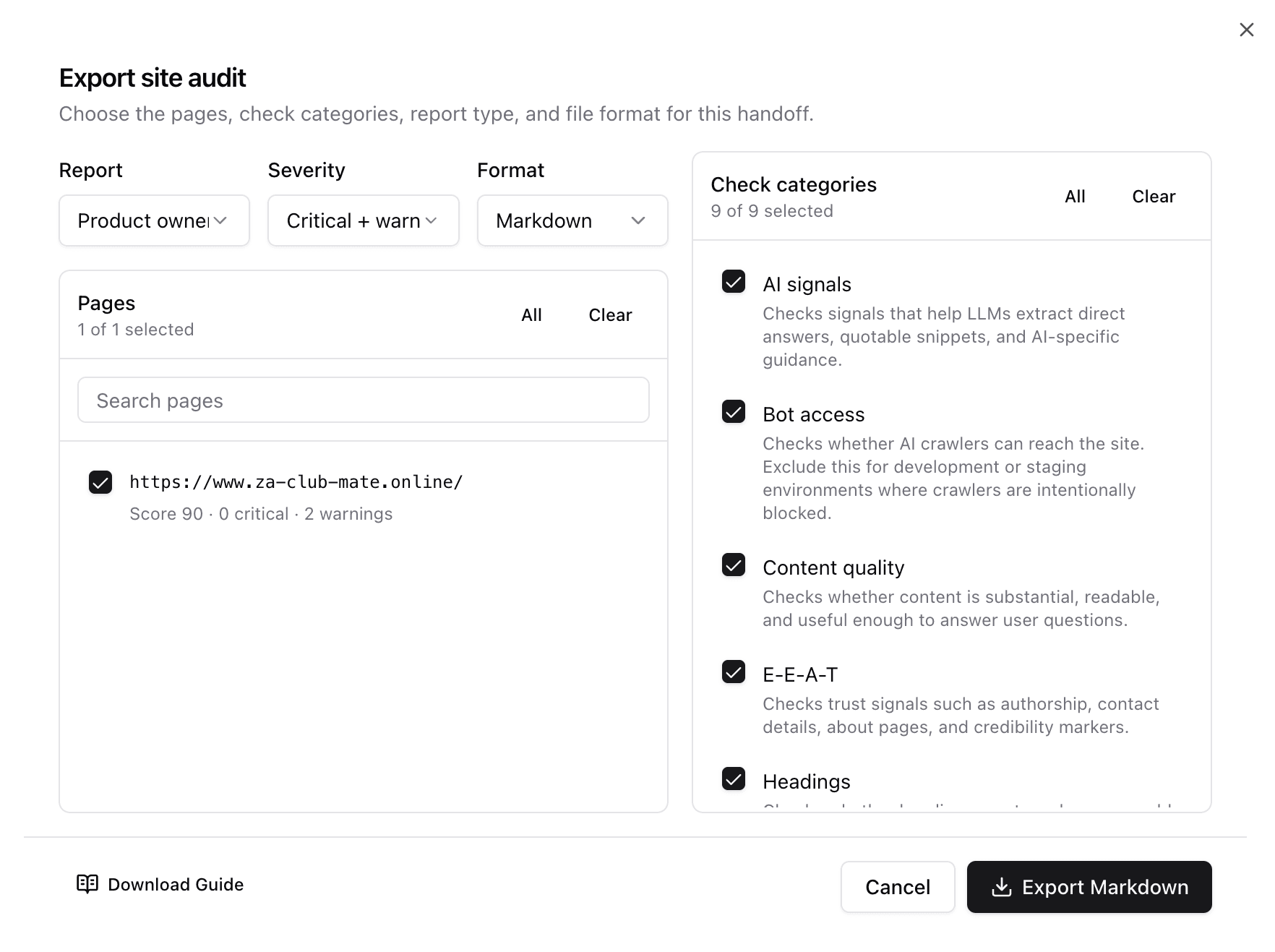
Export site audit reports as PDF as well as Markdown — for a product owner or for a developer, for the pages and categories you choose. The Help button opens a guide to reading the audit: the score, severities, every check and the exports. You can download it too.

The Export site audit dialog: report type, severity, format, the pages and check categories to include, and Download Guide

Learn more:Site audit

NewCompetitors

Suggested competitors

We surface brands that AI answers name next to yours but you don't track yet, with how often each one appears. Track the ones that matter with one click and dismiss the rest.

Learn more:Competitors

citeme.euAI & search visibility

Try the latest features on your own brand

Every update above is live in the app today.