Competitors
Which rivals you are compared with, how suggestions work, and what the comparison is built from.
Tracked and suggested competitors
- Suggested competitors are brands we found in AI answers next to yours that you don't track yet. Track the ones that matter and dismiss the rest; dismissed suggestions can come back later if they keep appearing.
- Adding a competitor by hand takes its website address. We fill in the name the assistants use most often, or the name from the website if they haven't named it yet.
- Active competitors are fully tracked. Inactive ones are paused, but their history stays visible.
Your plan sets how many active competitors each brand can have. Deactivate one to free a slot.
What is compared
Only competitors you have accepted appear in comparisons — brands that assistants merely mention stay out until you add them. For each competitor, over the selected period:
| Column | Meaning |
|---|---|
| AI visibility, sentiment, average position, share of voice | The same AI answer metrics as for your brand |
| Search visibility | How often search results show them — their own site ranks, or a listing names them |
| Mentioned by others | How often third-party search results name them |
| Search first-appearance position | How high they appear when they do |
| Audit score | Their latest site audit score |
Metrics are combined across all assistants by default. Use the Model filter in the upper part of the app, in the page header, to see a single one. The same comparison drives "Where you stand" on the Overview.
Competitor site audits
Every tracked competitor's website is audited every week with the same checks as yours. Open a competitor's audit from its row to see its score, critical issues and warnings, or run a new audit at any time. If assistants name competitors ahead of you and their sites are easier for AI to read, the site audit is the part of the gap that is entirely within your control.
Competitors over time
On each prompt and search query detail page you can see which brands keep appearing day after day and which only now and then, so you notice a rival gaining ground before it shows in the averages.
Unlike the comparison above, these views show every brand the assistants or search engines named, not only the competitors you track — so you can spot a new rival before you start tracking it. See A prompt's detail page and A search query's detail page.
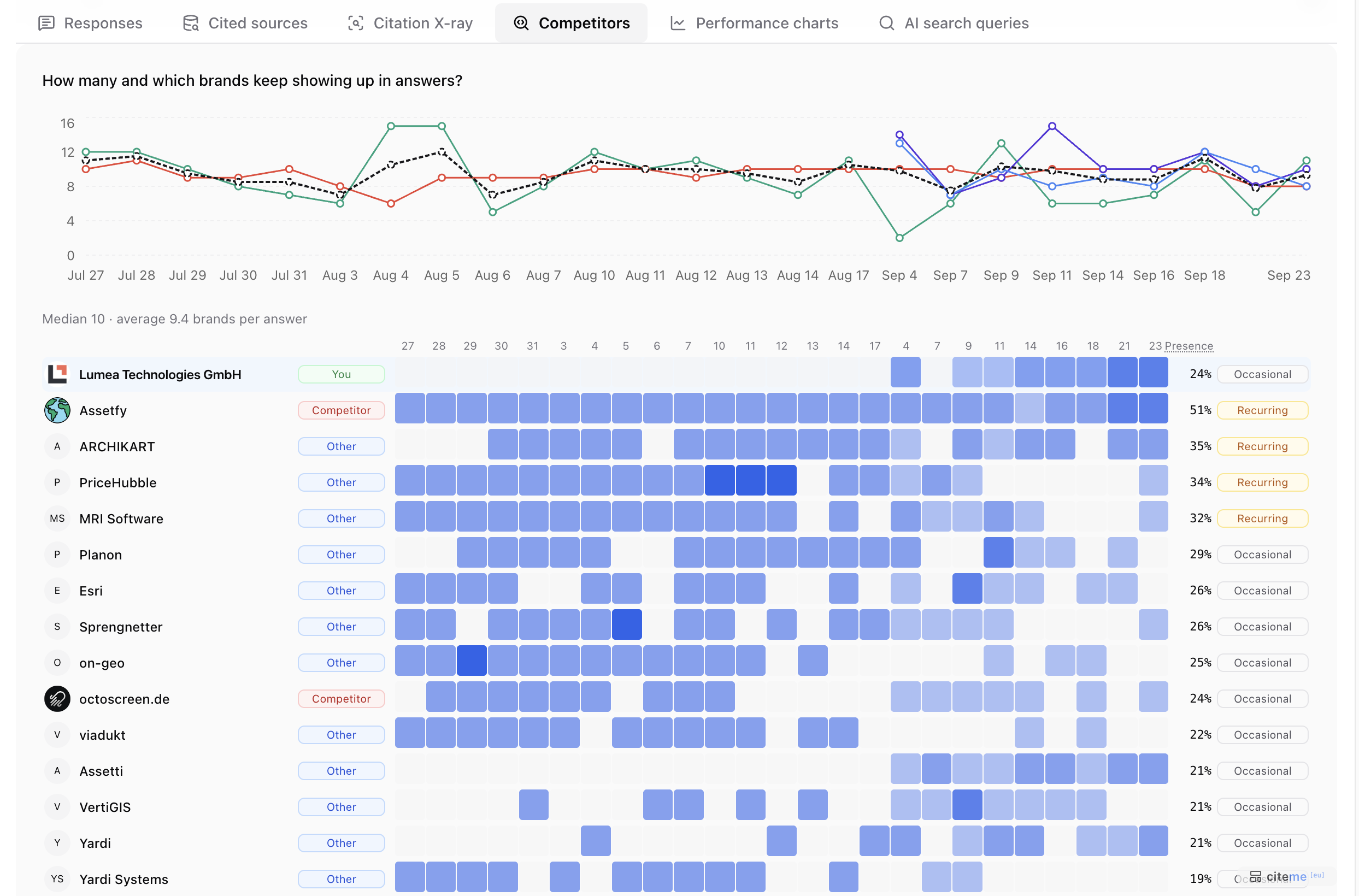 The Competitors tab on a prompt's detail page
This is the Competitors tab on a prompt's detail page:
- The chart shows how many brands the assistants named per answer, day by day. Each coloured line is one chatbot; the dashed line is their average. Below it are the median and average brands per answer.
- The map below the chart has a row for each brand and a column for each collection day. The darker a cell, the larger the share of that day's answers that named the brand.
- The label next to each name tells You, a tracked Competitor and Other (named, but not tracked) apart.
- Presence is the share of answers in the period that named the brand. A brand is Consistent from 80%, Recurring from 30%, and Occasional below that.
In the example, PriceHubble appears in 34% of answers — a recurring rival even though you don't track it (Other), which makes it a good candidate to add. Your own brand (You) only started appearing on September 4.