Generating prompts
Let the AI Assistant suggest prompts for your brand: choose the market, language and detail, or tailor them to what you offer.
The AI Assistant can suggest prompts to track for your brand. The suggestions are grouped by topic and based on your brand profile and what you already track, so you don't write every prompt by hand. You choose how they are written, review them, and accept the ones you want. Search queries are generated in the same place; see AI Assistant.
How to generate prompts
- Open the AI Assistant and choose the prompt ideas.
- Pick the topics the prompts should cover. Leave them all unticked for every topic.
- Set how many to generate, from 1 to 50.
- Choose the market and the language. The prompts are written in that language, and accepting them keeps it: Google AI Mode later uses it as its language setting on those prompts, and the other assistants follow the text. See Prompts and topics.
- Optionally write what the batch is for in What is this batch for?
- Set how detailed the prompts should be, and decide whether to tailor them (both below).
- Generate the batch, then review it.
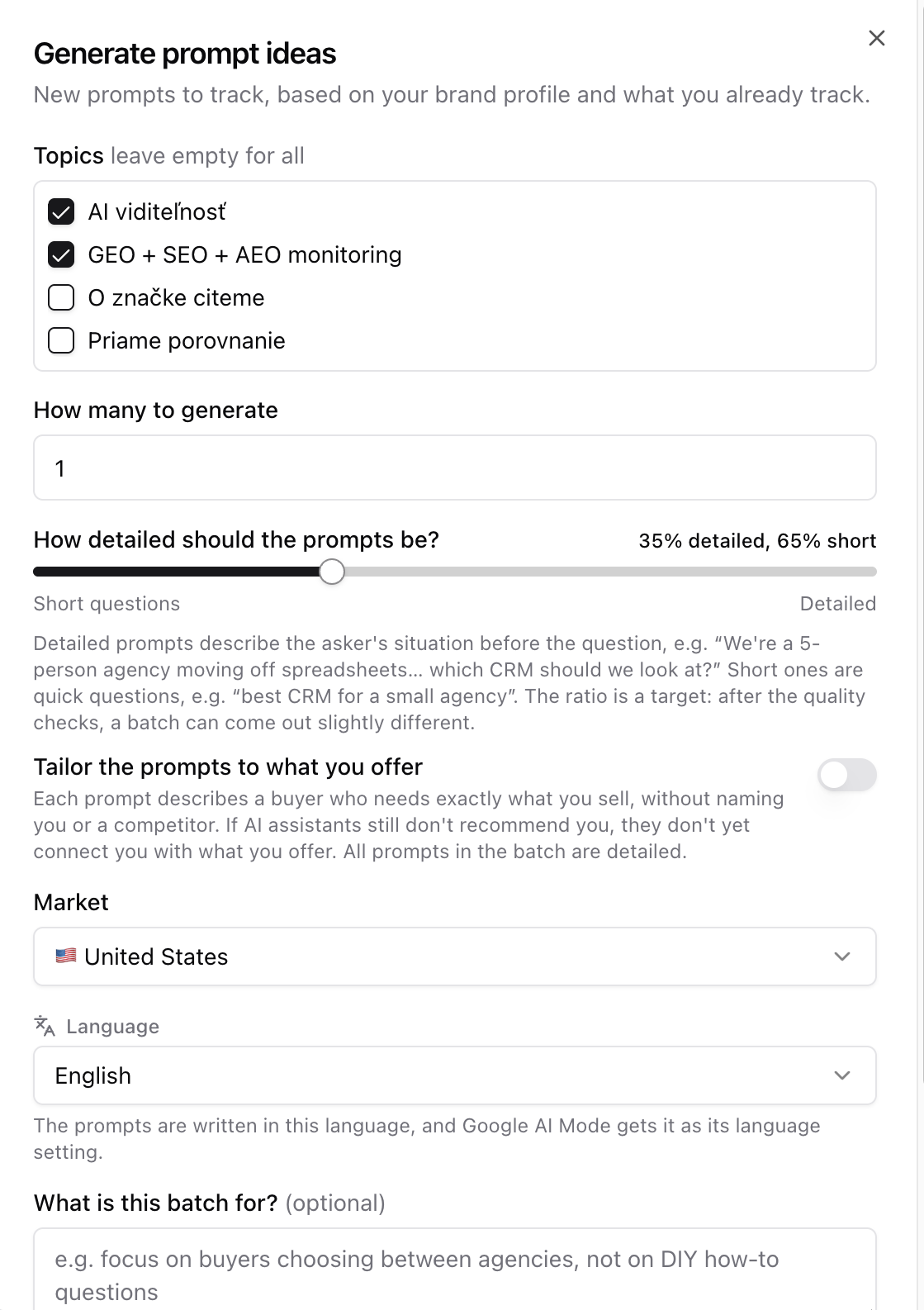 Generate prompt ideas
A batch costs one AI Assistant credit, whatever its settings. See Plans, runs and limits.
How detailed
The slider goes from all Short questions to all Detailed, in steps of 10%.
- A short prompt is a direct question in a full sentence that asks about one specific thing, for example "best CRM for a small agency".
- A detailed prompt is longer: it first describes who is asking, their situation and constraints, and only then asks. It simulates a customer's intent in detail, the way people actually write to AI chatbots.
The mix you set is a target, so a batch can come out slightly different.
Tailor the prompts to what you offer
Switch on Tailor the prompts to what you offer to test whether AI assistants connect your brand with what it actually sells. A short category question only tests whether you are named for a category. A tailored prompt describes a buyer who needs exactly what you offer, and the answers show whether the assistant then names you.
Use it when generic prompts about your category don't mention you, or when you want to know how you do once a buyer is specific. If an assistant still doesn't recommend you for a prompt that describes your offering this closely, it doesn't yet connect you with that offering. That points to what your site and other sources should say more clearly.
A tailored prompt never names your brand or a competitor. Every tailored prompt is detailed, so the slider is set to All detailed and greyed out while the switch is on.
The prompts follow your brand profile, so an accurate and complete profile gives better ones. They don't repeat prompts you already track. Tailoring is for prompts only; search queries have no such option.
Review the suggestions
Accept the prompts you want with one click. Discarded ideas won't be suggested again. Each idea has a Copy button.
Test prompt first adds a prompt, runs it once on every AI assistant and opens the live answers, where you keep or discard it. The idea itself stays pending until you decide.
Accepted prompts are tracked like any other prompt and appear in AI visibility under their topic. Tailored prompts are very specific, so read them as a separate test, not next to short category prompts. If an assistant doesn't name you for one, Citation X-ray shows which pages it would cite for that prompt and whether they answer it.