Site optimization for AI search
Change titles, headings and descriptions so ChatGPT, Gemini and Perplexity find your pages in the searches they run.
AI assistants search the web before they answer. Those searches are AI search queries, and the pages they find are the ones an assistant can cite. Site optimization compares them with the titles, headings and descriptions of your pages, and suggests what to change.
Track several prompts, and let them run for several days, before you start. The suggestions are built from the AI search queries those runs collected, and one prompt answered once rarely collects enough of them. The more prompts you track, and the longer they have been running, the more the result has to go on.
How to run it
Open the AI Assistant and choose Optimize site for AI search. Earlier runs are in the Results list on the same page; the Site optimizations filter shows only them.
- Time frame. You can change the range. AI visibility, search presence and the searches themselves all use the period you pick.
- Assistants. Only assistants that searched are listed. Each counts equally, and you can switch any of them off.
- Prompts. Every prompt that produced AI search queries in that window, grouped by topic, with its AI visibility, search presence and the number of searches. Paused prompts are included and marked. Select prompts under 10% visibility picks the ones you are losing. A prompt you leave unticked is protected if it already has AI visibility or search presence above 0%: a suggestion must not weaken the searches your pages already match for it. Prompts at 0% are left out, since there is nothing to keep, and they are often prompts you don't care about, such as one that names a competitor. The shield beside each unticked prompt shows which it is; click it to protect a prompt or leave it out.
Prompts that ask about your brand by name are left out, the same way they are left out of visibility numbers. See Brand-profile topic. Searches that name a company or product, look up a particular site, or repeat the prompt itself are left out too. You change those labels on AI search queries.
Results
Analyze my site uses one AI Assistant credit. If the analysis fails, the credit is returned. It usually takes about a minute. You can leave the page; the result is saved.
Three figures open the result:
- Target searches covered — how much of the searches you chose your pages already cover. Words in titles is how much of the search's wording the title says. Meaning is whether the title, heading and description say what the search looks for, even in other words. Meaning is the same check as Citation X-ray.
- Protected searches covered — words in titles and meaning again, for the prompts you protected.
- Pages read — up to 100 pages: first the ones you pinned in the site audit, then the latest audit, then the sitemap. A page hidden from search, or one that could not be read, is marked.
The summary says what to change first.
Words the searches use, and where your pages say them lists each word with its search weight and how many titles, headings and descriptions contain it. A red 0 means no page says the word. Another form of the same word, such as a different ending, is shown in brackets and counts for less.
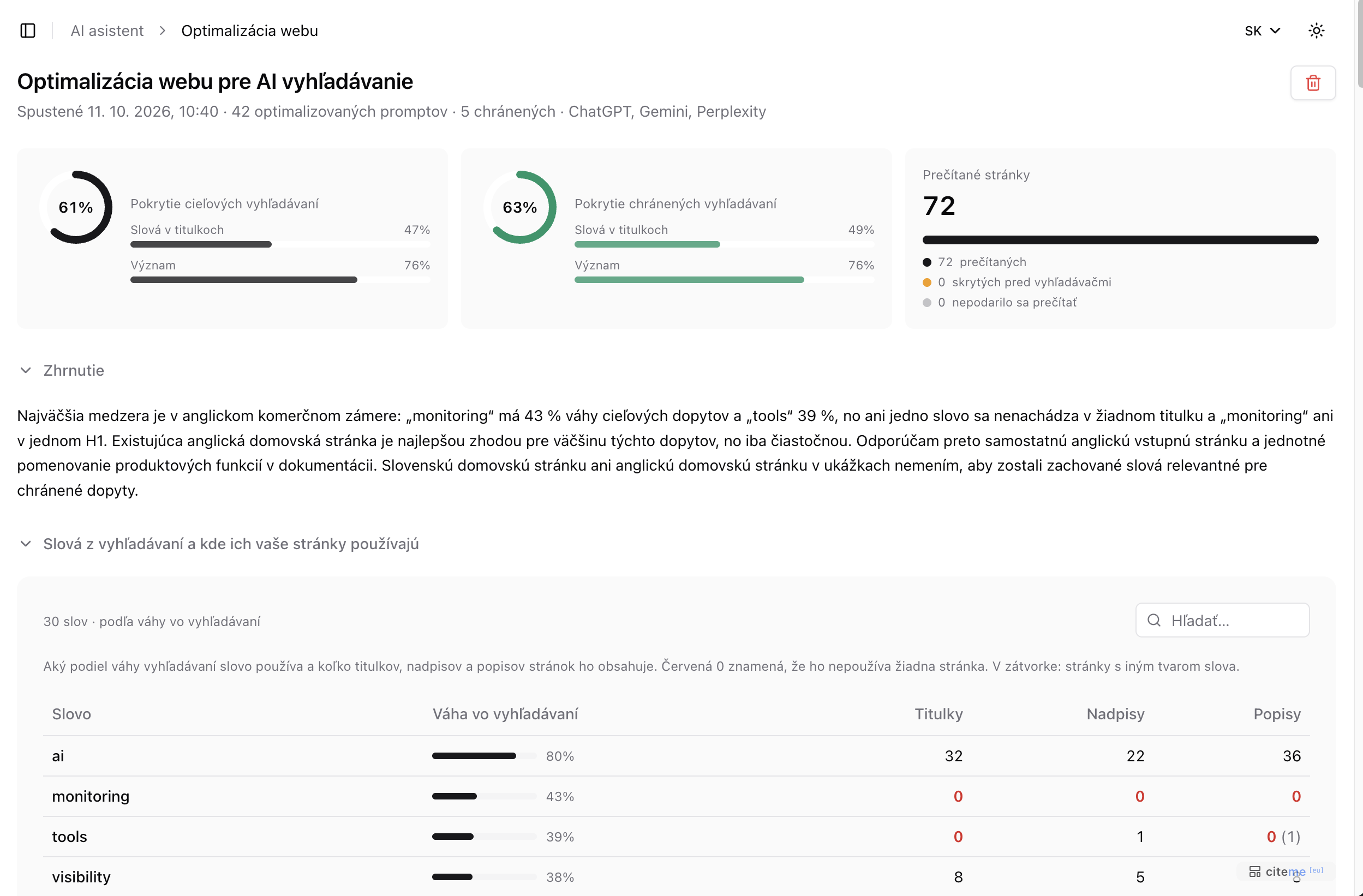 Site optimization for AI search (Slovak interface)
Examples of how to improve are numbered by priority. Each one has a type, such as Reword titles, Name it the same way, New page or Language version. It describes a finding, suggests what to do about it and lists the searches it covers. For the pages it concerns, it shows the title, heading and description you have now, next to a suggested one you can copy. Titles stay within 60 characters, headings within 70 and descriptions within 155, so a search result does not cut them off. A warning appears when a rewrite would drop words the target searches use, would no longer say what they look for, or would weaken a protected search. Don't copy that rewrite word for word: keep what it would lose, and adapt the rest.
Searches and your best page lists every search with a status, its weight, the assistants that ran it, how much of its wording the best page's title already uses, the meaning match, and that page. The status is a strong match, a partial match or not relevant, the same scale as Citation X-ray. Not relevant means even the closest page does not cover the search: the title does not use its words, and the title, heading and description do not say what it looks for. Track adds the search as a keyword, so Search Visibility measures where it really ranks. A search you already track shows Tracked. One you paused shows Resume, and resuming uses a keyword slot.
Pages read lists every page that was read, with its title, its source (pinned, site audit, sitemap or homepage) and how many searches it is the best match for. A page with 0 isn't the best answer to any search the analysis checked.
Export report creates a brief for Claude Code or another coding agent (Markdown), or a summary for the product owner (PDF).
Credits
Each analysis uses one credit from your monthly allowance. Deleting a finished one does not return the credit. A failed analysis doesn't spend a credit, so deleting it only removes it from the list.