Citation X-ray
Check your pages and the pages AI cites against one prompt, and see what the cited pages have that yours don't.
Citation X-ray helps you understand the pages AI chatbots cite for a given prompt. It shows why the chatbots use them, whether those sources name you or other brands, and how your pages compare with the cited ones. You see whether the content on your page actually answers the question in the prompt, or whether it states information that is useful for it.
What we check
Each selected page is compared with one prompt:
| Check | What it shows |
|---|---|
| Answers the prompt | Whether the page answers fully, partly, or is off-topic |
| Readable content | Whether the page has text a reader can learn from, or is empty or only navigation |
| Quotable | Whether the page states concrete facts, or only generic text. According to Google's and Bing's guidance, pages with clear factual statements are preferred in AI search |
| Names you | Whether your brand is on the page |
| Competitors named | Which of your active competitors the page names, or whether it is their site |
Running a check
The Citation X-ray tab is on every prompt's page in AI Visibility.
- Select your own pages. We offer them from the latest site audit.
- Select the most cited pages, or add your own extra pages. Cited pages show how many answers to this prompt cited them, with the most cited first. You can add your own address below the list. Only a limited number of pages can be checked at once.
- Start the check. The button is Check pages. It usually takes 10–30 seconds. Pages read in the last 14 days are reused; if you have just edited a page, turn on Re-read pages now. You can leave the tab — results are saved.
Search queries
AI assistants don't search for the prompt itself. They run their own searches, called search queries here, and the pages those searches find are the ones they can cite. Citation X-ray can check your pages against them too.
The picker has two tabs, Pages and Search queries. The second one lists the queries AI ran for this prompt, most used first under the model filter you chose, with the top 5 ticked. Show all lists the rest, and the search box and the Intent and Language filters reach every query. You can check up to 6. Technical lookups, such as site: searches, pasted addresses and tool calls, are never offered, because no page can answer them.
Each page is judged for each query on its title and text, in the page's own language:
- Strong result: the page is about the query's subject and covers most of the conditions it adds, such as a country, a price, reviews or support.
- Weak result: only the subject, only the conditions, or one section of a page about something else.
- Not relevant: no real connection to the query.
A page in another language than the query is at most a weak result, because search engines rarely rank it. This is relevance, not a measured position. To see where a query really ranks, use Track, which adds it as a keyword in Search Visibility.
Under Your pages, a line says for how many queries none of your pages is a strong result. Each page also shows for how many queries it is a strong result, and a collapsed AI search queries row lists every query with its verdicts. Runs from before this change don't show them.
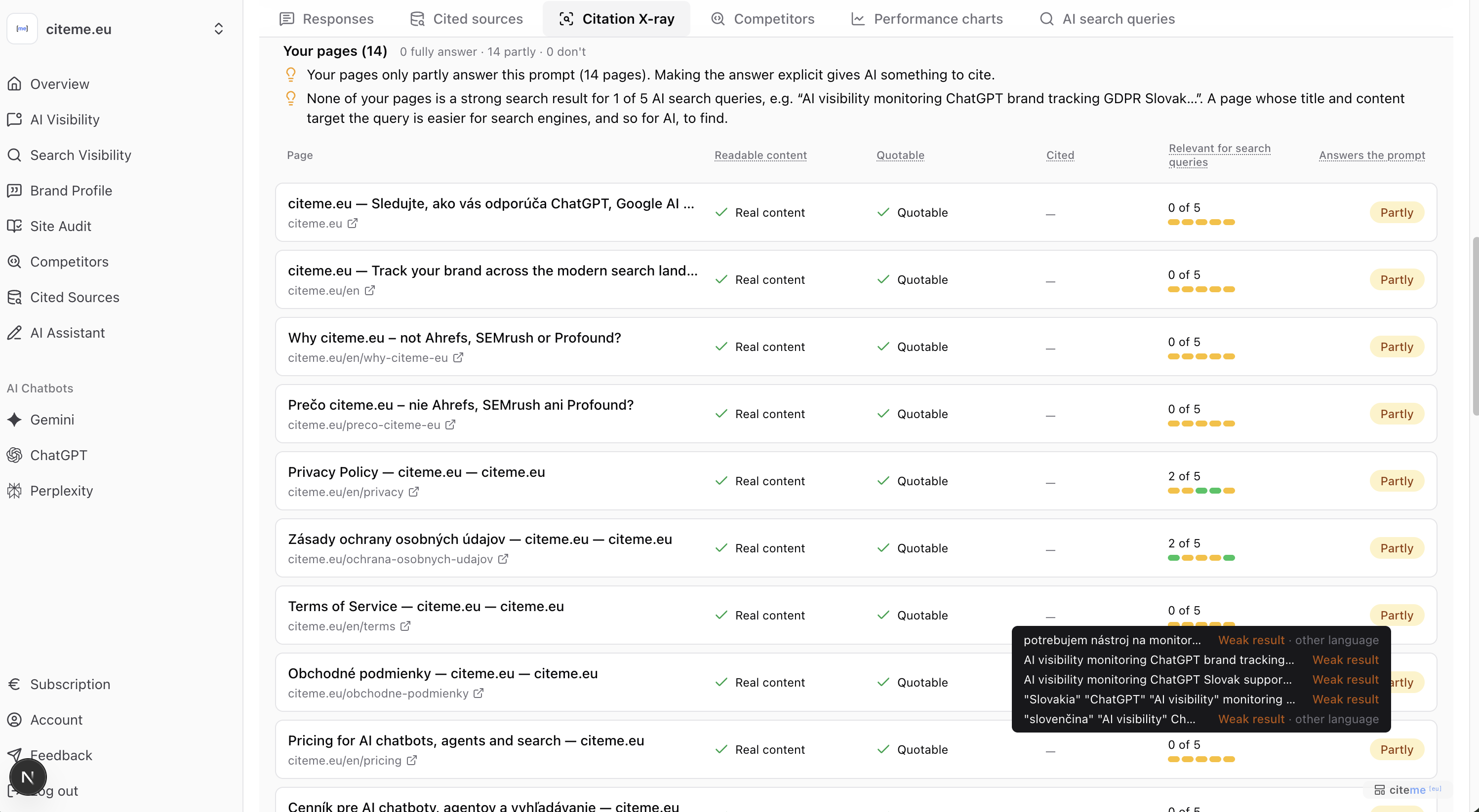 Relevance of your pages for the AI search queries
Results
After the check, the tab shows a summary of this prompt and then the individual pages.
Prompt summary
- whether the prompt is Generic or Specific;
- which tracked brand the answers to this prompt name most often, and where you rank.
Page groups
Results are grouped by where the page comes from:
- Your pages — whether any of them answers the prompt, whether it states concrete facts, and whether answers already cite it.
- Directories, marketplaces and communities AI cites — cited pages in those categories, and whether they name you.
- Other sites AI cites — articles and reviews the answers cite, and whether they name you or a competitor.
- Competitors' pages AI cites — sites of tracked competitors included in the check.
- Pages that couldn't be read — a login wall, an error or an empty page.
Each page also shows how many AI answers to this prompt cited it, following the current chatbot, persona and date filters.
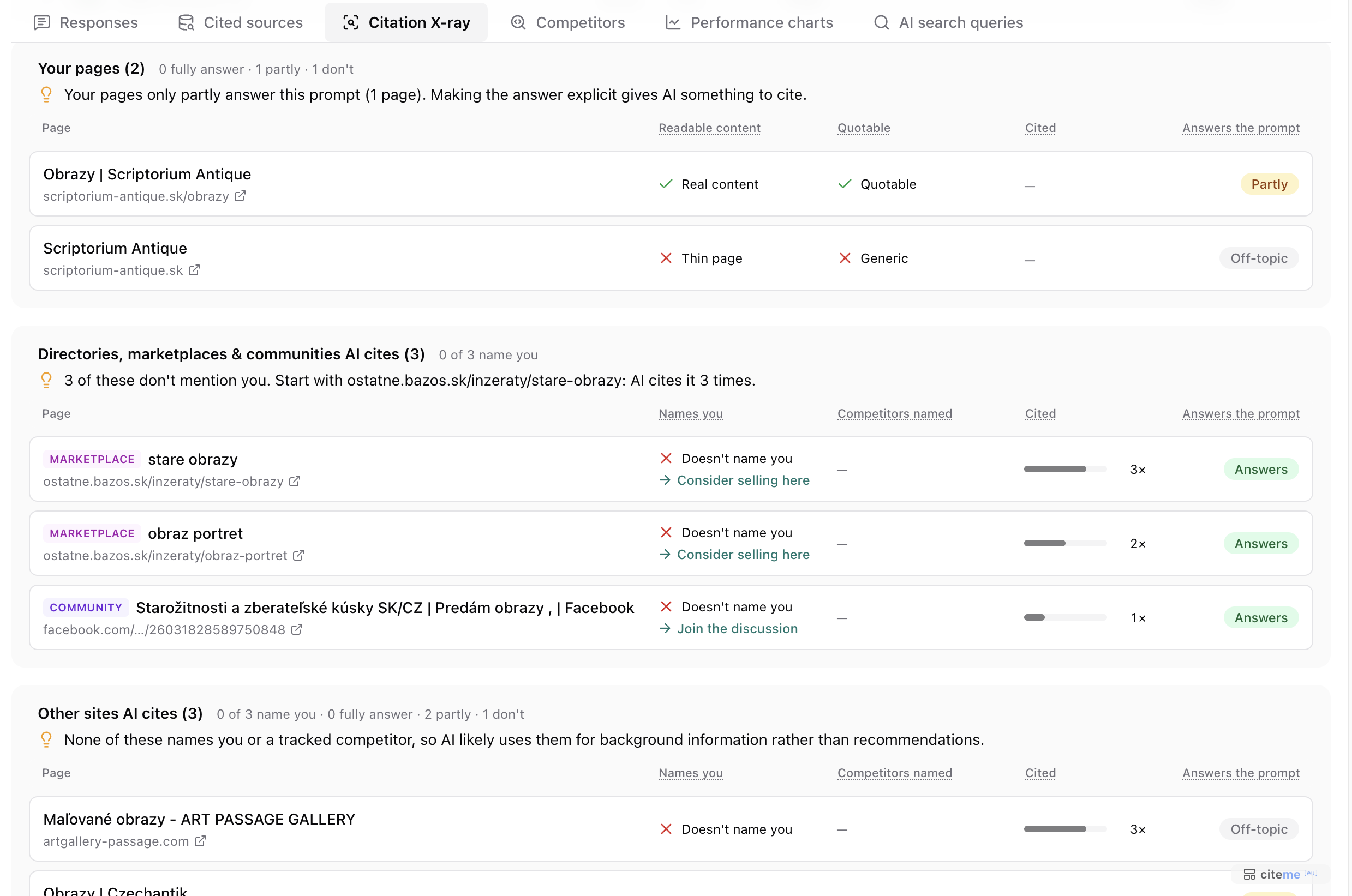 Citation X-ray results, grouped by page group
You vs competitors on this prompt
A table puts your brand and your competitors side by side: how many of the checked cited pages name each one, their AI metrics for this prompt, and how many pages each site has according to its latest site audit.