Cited Sources
The sites AI chatbots cite in their answers and search engines list in their results for your category, grouped by type, and the answers that cite nothing.
The metrics on this page are explained in detail on Source metrics.
Page filters
The filters in the upper part of the app, in the page header, set which data the whole page is built from — the categories, the table and the answers without sources.
- AI visibility / Search visibility — switches between the sources cited in the chatbots' answers to your prompts and the sites that appear in the search results for your search queries.
- Model — the average of all chatbots, or a single one. AI visibility only.
- Personas — only the answers given to the selected personas. What a persona includes is in the glossary. AI visibility only.
- Prompt type — All prompts, Brand profile (the sources assistants use when describing you) or AI Visibility (the sources behind category questions). AI visibility only.
- Search engine — Overall, Traditional or Agentic search. Search visibility only.
- Date range — the days the sources are counted over. A wider range also shows sources that are cited only now and then.
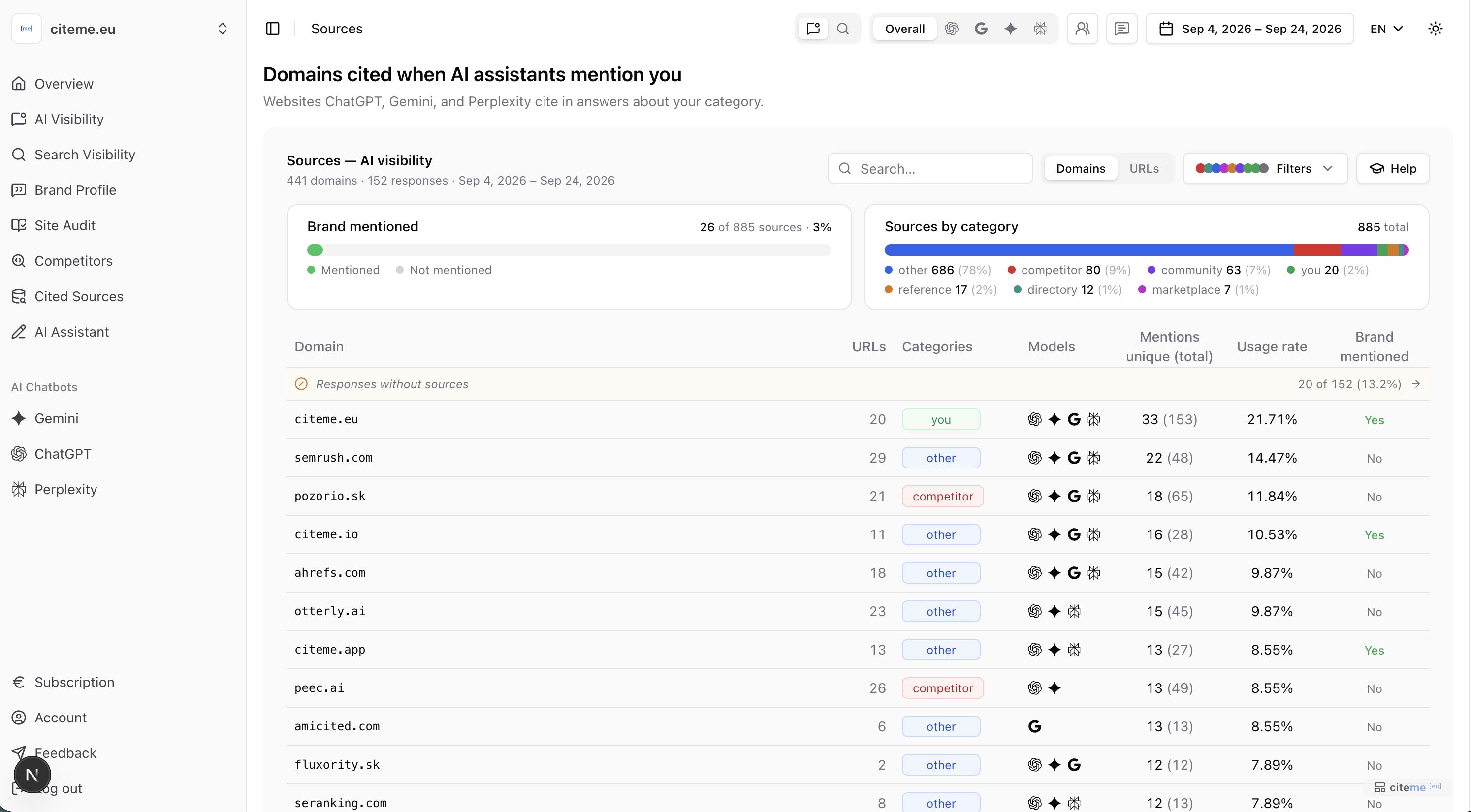 The Cited Sources page
In the header the filters appear as icons, from the left: the AI visibility / Search visibility switch (speech bubble and magnifier), Model (Overall and the chatbot icons), Personas, Prompt type and the date range.
Source categories
Every cited site is assigned a category:
| Category | What it is | Examples |
|---|---|---|
| You | Your own domain | — |
| Competitor | A competitor you track | — |
| Directory | Catalogs and review sites where you can claim a profile | Zoznam.sk catalog, Zlaté stránky, Trustpilot |
| Marketplace | Places where you appear by selling there | Heureka, Aukro, Bazoš, Booking |
| Community | Forums and social platforms | Modrý koník, Porada.sk, Reddit |
| Reference | Authoritative sites and official registers | Wikipedia, Slovak business register (ORSR) |
| Other | Everything else — news, blogs and brands that aren't your tracked competitors | — |
The sources table
For each source cited in AI answers you see:
- Mentions — unique (how many answers cited it) and total (all citations of its pages).
- Usage rate — the share of answers that cite it. See Usage rate.
- Which assistants cited it.
For search results, the table instead shows how often the source appeared in the results (search visibility), the position it first appears at, and how many of its pages and search queries contribute.
Table filters
These filters change only the table and the category chart above it, not the whole page:
- Domains / URLs — a summary per website, or a list of individual pages. In the URL view you can open a specific page to see the context the assistants cite it in.
- Search — searches domains and full URLs.
- Filters — narrow down by source category or by a specific domain.
The Sources by category chart above the table shows how the filtered sources split across categories. Table filters are kept in the page address, so you can share the exact view with a colleague.
A source's detail page
Click a domain in the table to open its detail page. The page filters still apply, so you see the same period, models and personas as in the table.
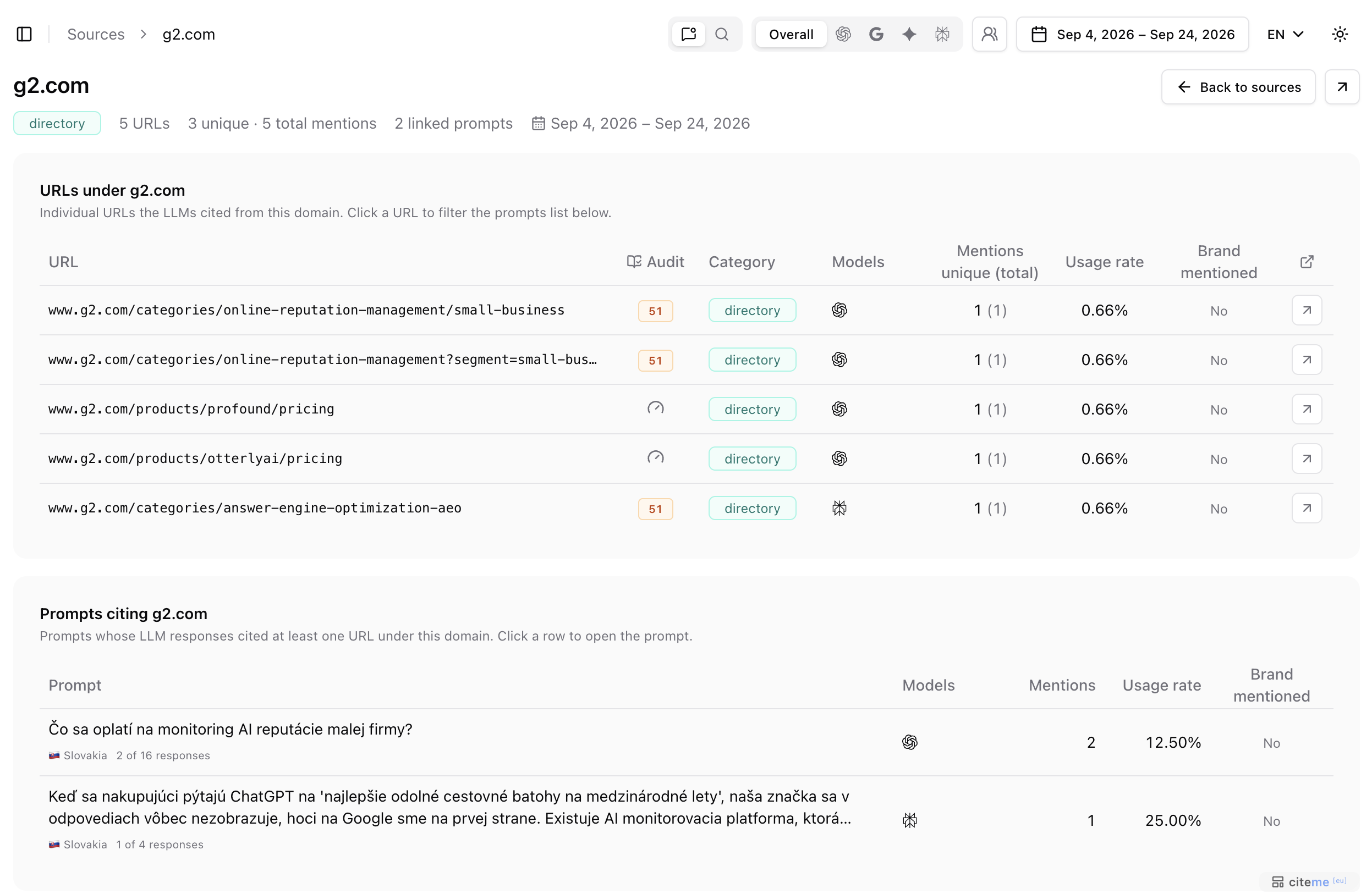 A source's detail page
- Header — the source's category, number of URLs, unique and total mentions, number of linked prompts and the period. The arrow in the top right opens the domain in a new tab.
- URLs under the domain — every page of the domain the assistants cited, with its audit, category, the models that cited it, mentions and usage rate. Click a URL to narrow the prompt list below to the answers that cited that page.
- Prompts citing the domain — the prompts whose answers cited at least one page of the domain. Each shows its market, how many answers cited it (for example 2 of 16), which models and the usage rate. Click a row to open the prompt's detail page.
In the example, g2.com is cited mostly by ChatGPT, and its pages come up for two prompts about monitoring AI reputation.
For search visibility, a source's detail page shows the domain's URLs that ranked in the results, ordered by best position, and the tracked search queries the domain appeared for.
Answers without sources
Answers that cite no web source are counted separately, with the prompts that produce them most often. Such answers come from the model's memory — or from a prompt that doesn't ask for a recommendation. See Ungrounded answers.
Auditing a source
Every cited URL — in the URLs view and on a source's detail page — has an Audit column. The icon means the page hasn't been checked yet; click it to run a site audit with the same checks we use for your own website. When it finishes, the icon turns into the score — click it for the details. The same button appears next to cited sources on a prompt's and an answer's detail page.
The audit shows how easy the pages that assistants already trust are for AI to read — a useful benchmark for your own pages. How the score is built is explained on Site audit score.