Monitoring AI bot activity
How often AI crawlers request your pages, as counted by Cloudflare, and which pages from your site audit they missed.
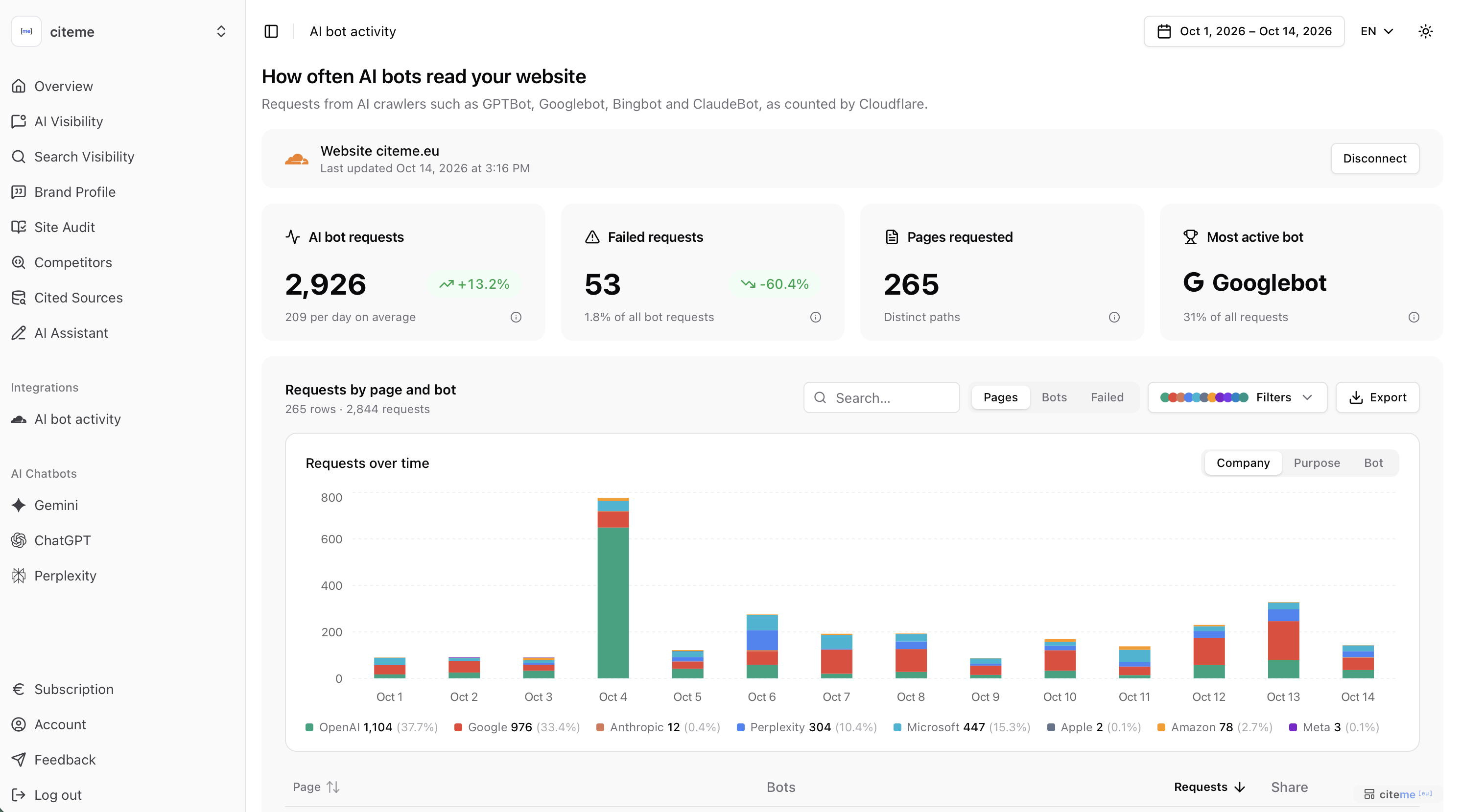
AI bot activity shows how often AI crawlers request your website, and which pages they open. The counts come from Cloudflare, not from the prompts citeme.eu asks. Cloudflare includes this on its free plan. Connecting is optional, and it does not change the site audit. The page has two tabs: Activity, and Page coverage, which shows which pages of your site audit the bots have read.
 AI bot activity
Connect Cloudflare
Open AI bot activity and choose Connect Cloudflare. Approve the connection in Cloudflare. citeme.eu reads these requests only and cannot change DNS or security settings.
The Cloudflare account has to include this brand's website. If it includes several sites, you pick one. If it includes none, nothing is saved.
The first import covers the last 30 days. After that, new requests are imported once a day. Requests appear only when the website's traffic goes through Cloudflare.
Activity
For the date range in the header:
| Tile | What it counts |
|---|---|
| AI bot requests | Every request the bots below made, as Cloudflare counted it, and the average per day |
| Pages requested | Pages with at least one bot request. Cloudflare reports pages separately from the daily totals, so this can be slightly lower |
| Most active bot | The bot with the most requests, and its share of all requests |
| Failed requests | Requests a bot got an error for, and their share of all bot requests |
AI bot requests and Failed requests compare the selected period with the period of the same length just before it. Until the imported history covers that earlier period they show "—". Cloudflare only provides the last 30 days, so the comparison stays empty until that history is in.
A failed request means the bot got an error: 404 the page was not found, 403 or 429 the site or Cloudflare turned the bot away, 5xx a server error. Some of these come from scanners that only pretend to be an AI bot. The Failed view lists each page, bot and status.
Requests over time groups the same requests by company, by purpose or by bot.
The table switches between Pages and Bots. You can search, filter by company and purpose, sort the columns and export CSV. A type filter separates pages, crawl files (robots.txt, sitemaps, llms.txt) and assets (JavaScript, CSS, images). Everything is shown by default.
Page coverage
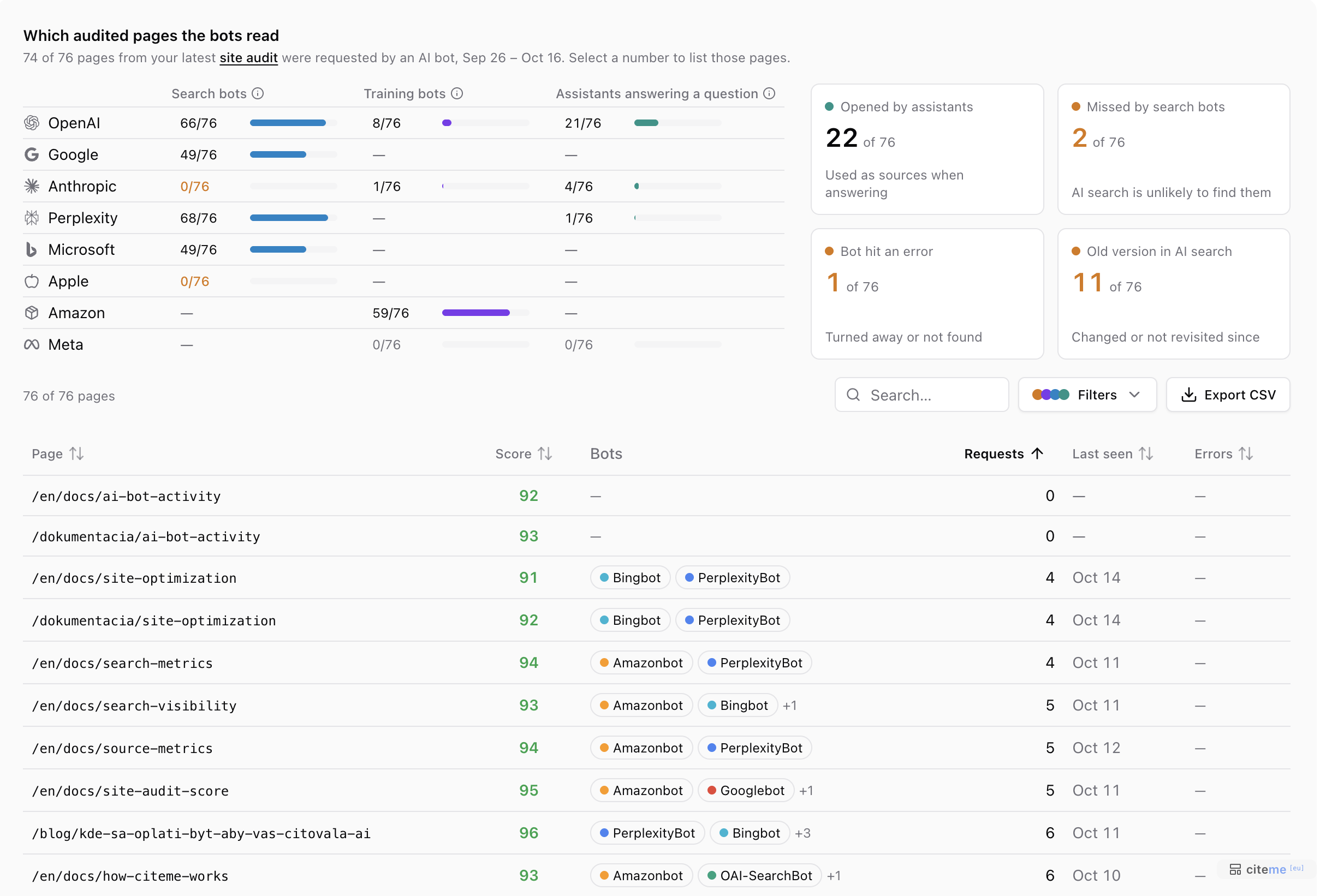
The Page coverage tab, next to Activity, joins your latest site audit with the bot requests, so you see which audited pages the bots actually read. It appears once Cloudflare has recorded bot requests in the selected range. Without a site audit it asks you to run one first.
 Page coverage
The heading counts the audited pages that at least one AI bot requested in the range. Only the pages of the latest audit are checked, up to 100, and a note says when your website has more.
Which bots visited your pages. A grid of companies by purpose shows how many audited pages each company's bots visited: search bots, training bots and assistants answering a question (see Why a bot came). Companies are never added together, because "search bots visited every page" can hide that one company read half of them and another the rest. A dash means the company has no bot for that purpose. Google's training bot (Google-Extended) is left out, because it is a robots.txt switch that never appears in requests. A search bot that read no page at all is shown in amber.
Select a number to list the pages behind it: for search and training bots, the pages that company has not visited; for assistants, the pages they opened. Select it again to clear. A gap for a search bot comes with one line on what to check: robots.txt and security settings if the company never visited, the sitemap and internal links otherwise.
Four cards sit beside the grid. Select one to narrow the table to its pages, and again to clear it.
| Card | Pages it counts | What to do |
|---|---|---|
| Opened by assistants | Pages an assistant opened while answering someone's question. They are used as sources, though not always quoted | Keep them accurate and up to date |
| Missed by search bots | Pages no company's search bot requested, so AI search is unlikely to find them | Make sure they are in your sitemap and linked from other pages |
| Bot hit an error | Pages a bot asked for and was turned away from or did not find | The error is shown in the table |
| Old version in AI search | Pages search bots read, but that changed after their last visit (by the date the site audit found), or that no search bot has revisited for 14 days or more | Link to them from newer pages and keep the sitemap lastmod up to date |
A problem count is amber while there is something to fix. When one of those three cards is at zero, it says so with a check mark instead of showing 0. Opened by assistants always shows a number, and that number is never amber.
The table lists each page with its audit score, bots (two shown, the rest as "+N"), requests, last seen date and the actual error, such as 403 or 404. A page with an old version in AI search has its last seen date in amber, with the reason on hover. The status of a page is one of Not visited, No search bot visit, Visited by search bots or Opened by an assistant. You can search, sort, filter by status, errors, score (under 60, or 60 and more) and version in AI search, and export CSV. Show all resets the filters. The grid and cards always cover every audited page; only the table narrows.
A page marked as not visited may have been read only rarely. On a busy day Cloudflare keeps just each bot's 50 most requested pages, and a note on the page says when that may have hidden some.
Why a bot came
| Purpose | What the bot is doing | Examples |
|---|---|---|
| Training | Collects pages to train future models | GPTBot, Google-Extended, ClaudeBot, Amazonbot, Meta-ExternalAgent |
| Search | Builds the index an assistant searches when it answers | OAI-SearchBot, Googlebot, Claude-SearchBot, PerplexityBot, Bingbot, Applebot |
| User request | Opens a page while someone is asking | ChatGPT-User, Claude-User, Perplexity-User, Meta-ExternalFetcher |
Bingbot is listed because Copilot answers from Bing's index. The companies are OpenAI, Google, Anthropic, Perplexity, Microsoft, Apple, Amazon and Meta.
What this is not
A crawler requesting a page is not the same as an assistant naming your brand. AI visibility still comes from the prompts. It is also not AI referrals, which count people who arrived at your site from an AI answer.
Disconnect
Disconnect asks you to confirm. citeme.eu stops reading new requests.