Search Visibility
How search engines list you — your own pages or third-party pages naming you — across traditional and agentic search.
The metrics on this page are explained in detail on Search metrics.
Search queries
A search query is a term citeme.eu runs against search engines on your plan's schedule — the search-side counterpart of a prompt. Each one has a market (the country results are collected from), a language, and a topic. Topics are shared with AI Visibility, so disabling a topic deactivates both its prompts and its search queries.
The language is independent of the market. Google usually derives it from the region, and you can override it; Bing works the same way. We send them the language you choose. The agentic engines do not: they only use the location. Left unchanged, it's the market's main language. You can pick any language; for markets with several official languages, such as Switzerland or Canada, the choice is shown right away.
There are three ways to add search queries:
- From AI search queries — the searches assistants actually ran while answering your prompts. This is usually the best source, because each one is a term a model demonstrably uses. See AI search queries.
- From AI Assistant ideas — suggestions grouped by topic, based on your brand and what you already track. See AI Assistant.
- By hand.
A newly tracked search query starts running straight away.
Search engines
Results are reported for two kinds of search, always side by side:
- Traditional search — Google and Bing.
- AI search (agentic) — Tavily, Exa and Perplexity Search, the services AI agents use to find pages to read.
When Google shows an AI Overview above the links, it is captured too, with the brands it names. See Traditional vs agentic search.
Results summary
The page opens with a summary of your search visibility results (from 20 search runs): Found, Found late, Found through others or Rarely found. The thresholds are listed on Search metrics. Visibility by topic shows search visibility in each topic. A topic is behind when it has at least 20 searches and its visibility is not higher than the typical visibility of the competitors you track (the lower quartile of their visibility, so that a few strong competitors don't turn every topic into a problem). Without tracked competitors that have data, the bar is 10%.
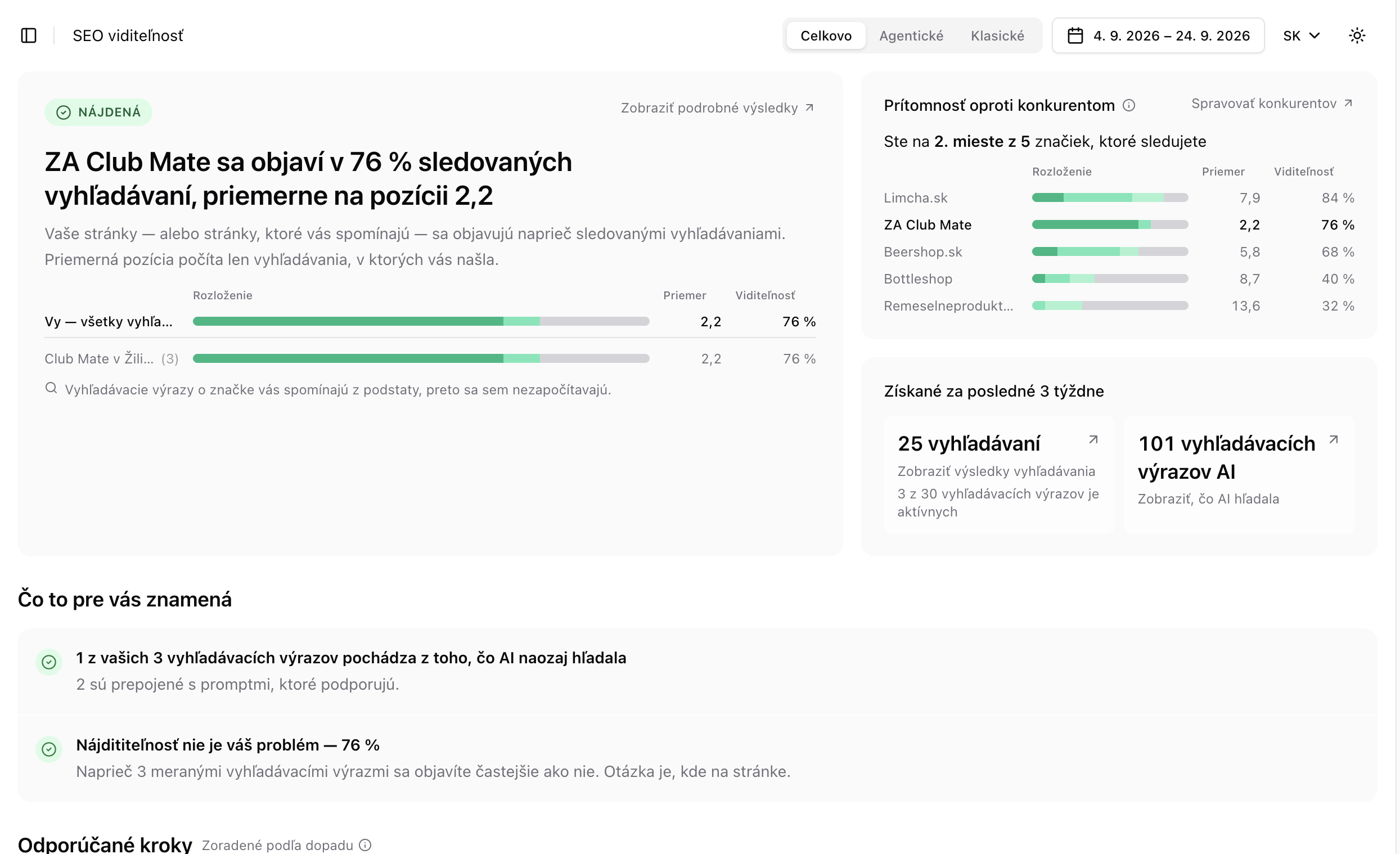 The results summary on the Search Visibility page (Slovak interface)
The Distribution bar shows where you rank the first time you appear:
- dark green — positions 1–3,
- medium green — positions 4–10,
- light green — position 11 or lower,
- grey — searches where you don't appear at all.
In the example above, most of ZA Club Mate's bar is dark green — when the brand appears, it is almost always in the top 3. The grey remainder is the 24% of searches where it didn't appear (its visibility is 76%). Every brand in the competitor comparison has the same bar. Hover over a bar to see the exact numbers. Use the Overall / Agentic / Traditional switch at the top of the page to see traditional and agentic search separately.
Standing, coverage and actions
Like AI Visibility, the page compares you with your tracked competitors on search visibility, shows how much of your plan you use, and lists findings and recommended actions — for example search queries where you never place, a gap between traditional and agentic search, or competitor pages that carry your name.
The search queries table
Open the table with the All search queries and metrics link, or by clicking the X searches tile, where X is the number of searches collected in the selected period. It lists each topic and search query with search visibility, how you appear (your own site, others naming you, or both) and first-appearance position. Choose which columns to show, and use bulk edit to enable, disable, move or delete several search queries at once.
The X AI search queries tile opens a different table: every search query the AI chatbots used while answering your prompts. You can start tracking them from there. See AI search queries.
A search query's detail page
- Results — every search run, with the ranked results, the pages that are yours or name you, and the AI Overview if Google showed one.
- Sources — the domains that rank for the search query.
- Competitors — which of your competitors appear, and how.
- Linked prompts — the prompts whose answers issued this search. Ranking better here should help all of them.
- How results vary over time — heatmaps of which brands and sources keep showing up in the results.